We are in an era where people are spending more time on social media, scrolling through posts and feeds to find something interesting. This brings an opportunity for businesses to find their target audience and sell their products. But how can you make it an effortless shopping experience? That’s when Instagram Shopping emerges to change the game.
The Instagram Shopping feature is one of the best Instagram marketing strategies for small businesses. As a business owner, using this feature not only helps you reach potential customers but also creates a personalized shopping journey for your audience. With the platform’s evolution, a strategic approach to Instagram Shopping is no longer optional—it’s a critical component of modern e-commerce. Let’s dive in and unlock the potential of this dynamic platform for 2025 and beyond.
What Is Instagram Shopping?
Instagram Shopping was first introduced in 2016. Initially, the feature allowed businesses to tag products in their posts, enabling users to click through to product information and purchase options.
Since then, the Shop feature on Instagram has expanded and has now become one of the most useful features on the platform, which can transform your Instagram profile into a digital storefront, enabling users to discover, browse, and purchase products directly through the app. As we move into 2025, this feature has matured into a comprehensive ecosystem designed to shorten the customer journey from discovery to conversion.
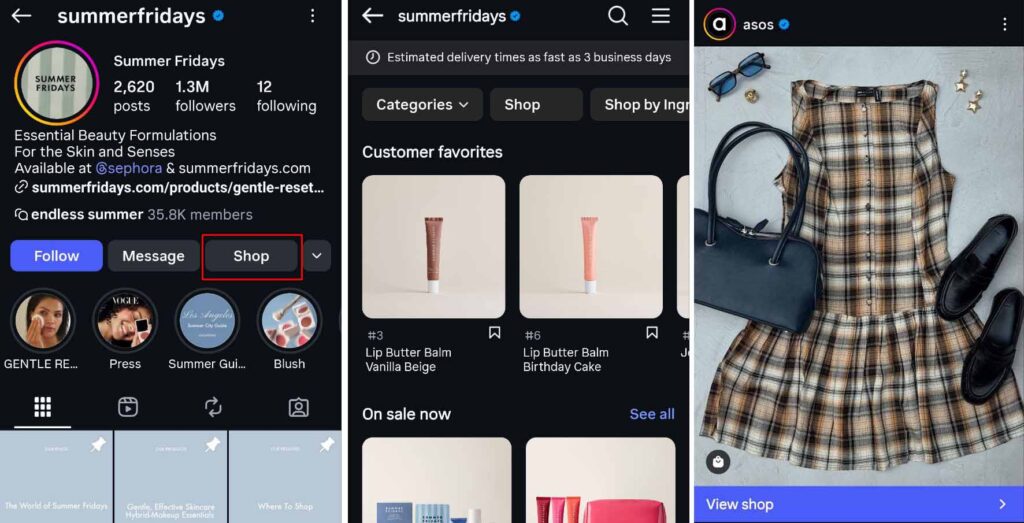
Key components include:
- Shop Tab: A customizable storefront on your profile where users can browse your entire product catalog, organized for optimal discovery.
- Collections: Grouped sets of products (e.g., by theme, season, or category) for easier navigation and thematic storytelling.
- Product Detail Pages: Dedicated pages within Instagram showing high-quality images, detailed descriptions, prices, and links to buy.
- Product Tags: Clickable tags in feed posts, Stories, Reels, and Guides that reveal product info and direct users to purchase (now primarily via website redirect).
- Product Launches: Tools to build hype with countdowns, reminders, and waitlists (availability may vary by region).
- Instagram Checkout: Previously allowed in-app purchases, but is being discontinued in favor of website checkout as of late 2025. This strategic shift by Meta emphasizes driving traffic to your owned digital property.
The Strategic Benefits of Instagram Shopping in 2025
After setting up an Instagram Shop, a dedicated button appears on your profile, signaling to your audience that you have an available shop. This single point of access unlocks a cascade of strategic advantages:
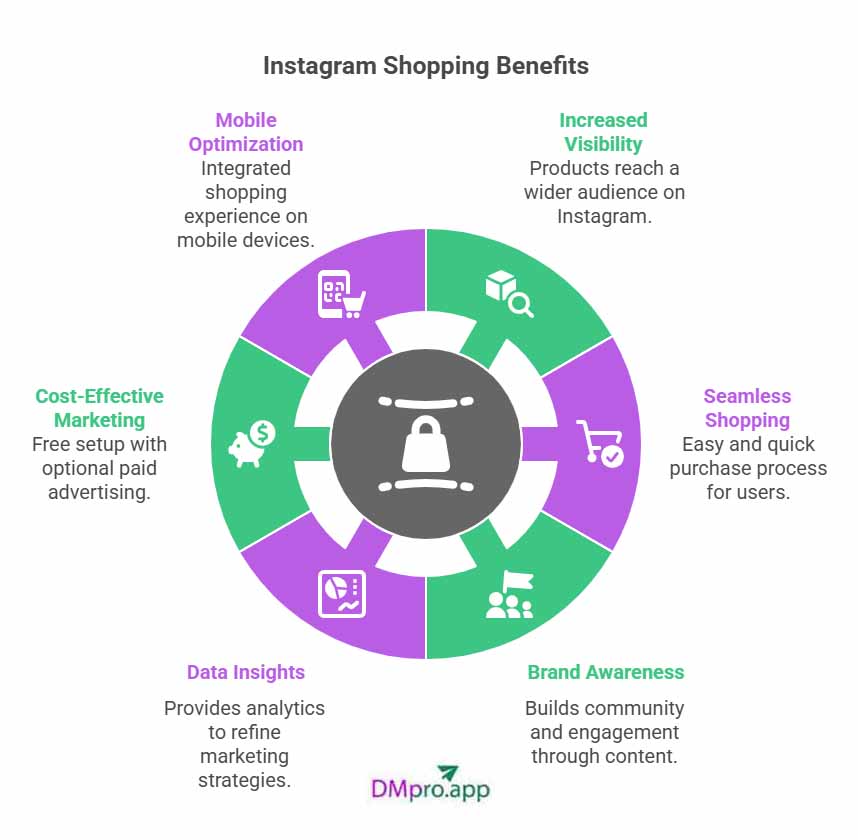
Enhanced Discovery and Amplified Reach
Your products transcend your follower base. They appear in the dedicated Shop tab, the Explore page, and within relevant feeds through algorithmic recommendations. With over 85% of Instagram users reportedly exploring new products on the platform, this expanded visibility is invaluable. Brands leveraging Shopping features effectively have documented traffic increases of up to 1,416% and revenue growth of 20% or more.
A Frictionless Path to Purchase
Instagram Shopping minimizes the steps between inspiration and action. Users can view detailed product information without leaving the app, reducing the “friction” that often leads to abandoned carts. This seamless experience is proven to boost conversion rates and capitalize on impulse purchase behavior, which is heightened in a visually immersive environment.
Deepened Brand Engagement and Community Building
Shopping features integrate natively with Instagram’s core content formats. You can tag products in engaging Reels, ephemeral Stories, and informative Guides, transforming passive viewing into interactive shopping. This builds a stronger community around your brand, as 83% of users say Instagram helps them discover new products. It’s marketing and sales woven into a single, cohesive experience.
Actionable Data and Consumer Insights
Gain access to vital analytics within Instagram Insights and Commerce Manager. Track metrics like product page views, link clicks, and sales attributed to the platform. This data is crucial for understanding what resonates with your audience, allowing you to refine your product offerings, content strategy, and advertising spend with precision.
Cost-Effective Marketing Foundation
Establishing your Instagram Shop is free. This creates a powerful, always-on sales channel without upfront software costs. To amplify its productivity, you can strategically layer paid efforts, such as targeted Instagram advertising or influencer collaborations, knowing your shopfront is ready to convert that traffic.
Native Mobile Optimization
With the vast majority of Instagram usage occurring on mobile devices, the integrated shopping feature meets users where they are. It eliminates the disruptive experience of switching between apps or browsers to complete a purchase, catering to the mobile-first consumer expectation for immediacy and convenience.
Critical 2025 Update: By the end of August 2025, native in-app checkout will no longer be supported for the majority of shops. This means purchases will redirect users to the seller’s external website to complete transactions. While this changes the final step, the immense discovery and consideration benefits of Instagram Shopping remain fully intact.
Instagram Shop Requirements
Before diving in, ensure you meet Instagram’s updated criteria for 2025. Proper setup is foundational to success:
- Account Type: You must operate an Instagram Business or Creator account linked to an active Facebook Page.
- Location: Your business must be located in a supported market (over 50 countries, including the US, UK, Canada, Australia, and most of Europe).
- Product Eligibility: The feature is primarily for physical goods. Services, digital downloads, or certain regulated items may not qualify. Review Meta’s Commerce Policies thoroughly.
- Compliance & Trust: You must adhere to Instagram’s commerce policies and Merchant Agreement. A clear, publicly accessible customer service information, shipping policy, and return/refund policy are mandatory to build consumer trust.
- Technical Setup: You will need a verified website domain, the latest version of the Instagram app, and a product catalog set up via Facebook Commerce Manager or an integrated e-commerce platform like Shopify, BigCommerce, or WooCommerce.
How to Set Up Instagram Shopping: A 2025 Guide
Setting up a Shop on Instagram is a straightforward process that lays the groundwork for future sales. Follow this step-by-step guide to ensure a correct and optimized setup.
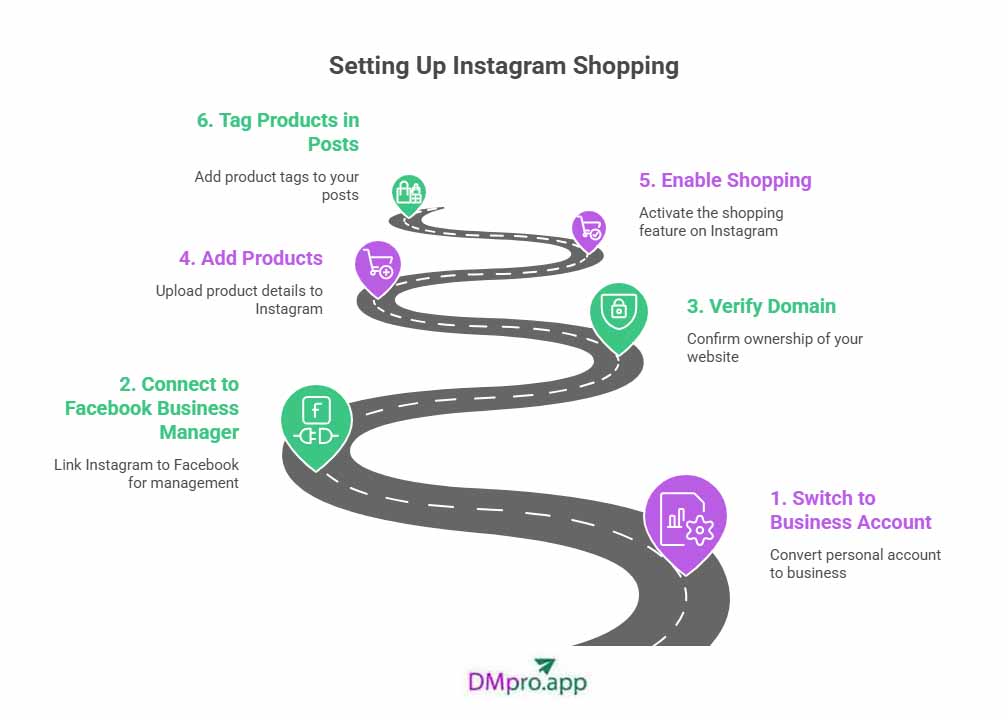
#1: Switch to a Professional Business Account
The Shopping feature is exclusively available for Instagram Professional accounts (Business or Creator). If you’re on a personal account, this is your first essential step.
- Navigate to your Instagram profile and tap the menu (three lines) in the top right.
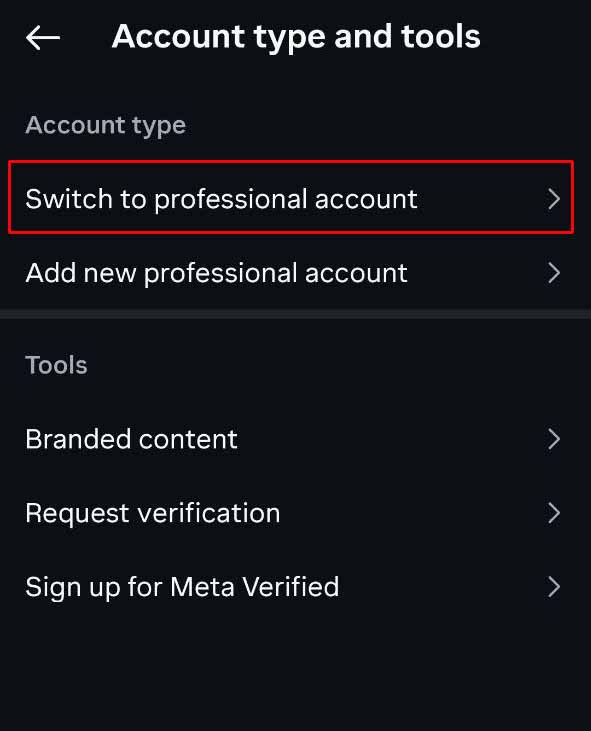
- Go to Settings > Account > Switch to Professional Account.
- Select “Business” as your account type and follow the prompts.
- Connect your account to a corresponding Facebook Page. If you don’t have one, you’ll be guided to create it during this process.
#2: Connect to Meta Business Suite and Commerce Manager
Your Instagram Shopping infrastructure is managed through Meta’s back-end tools. This step centralizes your assets.
- Go to Meta Business Suite.
- Ensure you are logged in with the Facebook account that manages your linked Page.
- From the Business Suite, navigate to Commerce Manager. This is the hub where you will create and manage your product catalog.
- If Commerce Manager isn’t immediately available, check your region’s eligibility under “Instagram Shopping requirements.”
#3: Upload Your Product Catalog
Your catalog is the database of all products you wish to sell. You have two primary methods:
Method A: Use an E-commerce Platform Integration (Recommended)
Platforms like Shopify, BigCommerce, or WooCommerce offer seamless integrations. Once connected, your store’s inventory automatically syncs with Commerce Manager, streamlining updates and stock management.
Method B: Manually Create a Catalog in Commerce Manager
If you don’t use a supported platform, you can create a catalog manually:
- In Commerce Manager, click “Add Catalog” and select “E-commerce.”
- Choose “Upload Product Info” to add items one-by-one or via a data feed file.
- For each product, include high-resolution images, accurate titles, compelling descriptions, clear pricing, and direct links to the product page on your website.
#4: Submit Your Account for Review
Once your catalog is populated, you must submit your Instagram account and shop for review by Meta.
- In your Instagram app, go to Settings > Business > Shopping.
- Follow the on-screen instructions to connect the product catalog you just created.
- Select the checkout method (typically “Checkout on Your Website”).
- Submit your account for review. This process can take from a few hours to several business days. Meta will check for compliance with their policies and the accuracy of your store information.
#5: Activate Your Shop and Start Tagging
Upon approval, you’ll receive a notification from Instagram. The “Shop” tab will appear on your profile, and you can begin tagging products in your content.
- In Feed Posts: When creating a new post, after selecting an image, tap “Tag Products” before publishing.
- In Stories: Use the product sticker from the sticker tray to tag items.
- In Reels and Guides: The tagging option is available during the publishing workflow.
- Organize Your Shop Tab: Use Collections in Commerce Manager to group products into themed categories (e.g., “Summer Collection,” “Best Sellers,” “New Arrivals”) for a better user experience.
10 Advanced Strategies to Boost Sales on Instagram in 2025
With your shop established, execution is key. These advanced strategies are designed to maximize your sales potential in the current landscape.
1. Leverage Shoppable Video Content Dominance
Video, particularly Reels, receives prime algorithmic real estate. Create short, engaging Reels that demonstrate your products in action. Use trending audio and hooks to capture attention within the first two seconds, and tag the featured products directly within the Reel. How-to tutorials, behind-the-scenes looks, and customer testimonials in video format drive exceptionally high engagement and conversion.
2. Master the Art of Storytelling with Collections
Move beyond a simple list of products. Use Collections in your Shop tab to tell a story. Create a collection for a specific lifestyle, a problem your product solves, or a seasonal theme. This curates the shopping experience and can increase average order value by encouraging bundled purchases.
3. Optimize for the Website Redirect
With the shift away from in-app checkout, the user’s transition to your website is critical. Ensure your product landing pages are:
- Mobile-optimized and load instantly.
- Consistent with the imagery and description seen on Instagram.
- Equipped with a streamlined, trusted checkout process (e.g., PayPal, Apple Pay options).
4. Implement a Strategic UGC (User-Generated Content) Tagging System
Encourage customers to post photos with your products and tag your brand. Feature this content on your profile (with permission) and tag the products in their UGC posts. This provides powerful social proof and demonstrates real-world use, building trust and credibility far more effectively than branded content alone.
5. Utilize Shoppable Guides for Expert Curation
Instagram Guides allow you to curate posts and products into a scrollable, editorial format. Create Guides like “Gift Guide for Her,” “Office Essentials,” or “Sustainable Living Starter Pack.” Incorporate your shoppable posts into these guides to provide context and inspiration, positioning your brand as an authority while driving sales.
6. Run Targeted Shoppable Ad Campaigns
Use Facebook Ads Manager to create campaigns with a “Conversions” objective, utilizing the dynamic product ad format. These ads automatically showcase products from your catalog to users who have shown interest, effectively retargeting website visitors or lookalike audiences. The shoppable tags within the ads create a direct path to purchase.
7. Host Live Shopping Events
Instagram Live Shopping combines real-time interaction with instant purchasing power. Host Q&A sessions, product launches, or styling workshops live. Pin product tags during the stream, creating a sense of urgency and community. Promote the live event beforehand to build anticipation and maximize attendance.
8. Analyze and Iterate with Data
Regularly review your Instagram Insights and Commerce Manager analytics. Identify:
- Which products get the most views and clicks?
- Which content formats (Reels, Stories, Posts) drive the most traffic?
- What are your peak engagement times?
9. Foster Seamless Influencer & Affiliate Partnerships
Collaborate with influencers whose audience aligns with your target market. Provide them with unique affiliate discount codes and ensure they tag your products in their content. This expands your reach to a trusted community and drives trackable sales. In 2025, nano and micro-influencers often yield higher engagement and ROI.
10. Prioritize Community Engagement and Service
Your Instagram Shop is not a set-and-forget tool. Actively respond to comments and questions on your shoppable posts. Use DMs to provide personalized customer service. This direct engagement builds loyalty, reduces pre-purchase anxiety, and can turn a hesitant browser into a confident buyer.
Conclusion: The Future of Social Commerce is Here
Instagram Shopping in 2025 represents a mature, indispensable channel for modern businesses. While the technical process of redirecting to your website is now the final step, the platform’s unparalleled power for product discovery, brand storytelling, and creating a seamless inspiration-to-consideration journey remains its core value. By setting up your shop correctly, adhering to best practices, and implementing these advanced, platform-native strategies, you transform your Instagram presence from a marketing billboard into a dynamic, revenue-generating storefront. The businesses that will thrive are those that understand this is not just a feature—it’s the new standard for integrated social commerce. Start building, optimizing, and engaging today to secure your sales growth tomorrow.
✨ Enhanced Content ✨
We are in an era where people are spending more time on social media, scrolling through posts and feeds to find something interesting. This brings an opportunity for businesses to find their target audience and sell their products. But how can you make it an effortless shopping experience? That’s when Instagram Shopping emerges to change the game.
The Instagram Shopping feature is one of the best Instagram marketing strategies for small businesses. As a business owner, using this feature not only helps you reach potential customers but also creates a personalized shopping journey for your audience.
Let’s dive in and unlock the potential of this dynamic platform!
What Is Instagram Shopping?
Instagram shopping was first introduced in 2016. Initially, the feature allowed businesses to tag products in their posts, enabling users to click through to product information and purchase options.
Since then, the Shop feature on Instagram has expanded and has now become one of the most useful features on the platform, which can transform your Instagram profile into a digital storefront, enabling users to discover, browse, and purchase products directly through the app.
Key components include:
- Shop Tab: A customizable storefront on your profile where users can browse your entire product catalog.
- Collections: Grouped sets of products (e.g., by theme, season, or category) for easier navigation.
- Product Detail Pages: Dedicated pages within Instagram showing images, descriptions, prices, and links to buy.
- Product Tags: Clickable tags in content that reveal product info and direct users to purchase (now primarily via website redirect).
- Product Launches: Tools to build hype with countdowns, reminders, and waitlists (US-only in some cases).
- Instagram Checkout: Previously allowed in-app purchases, but is being discontinued in favor of website checkout as of late 2025. (or may not be available in all regions).
Benefits of the Instagram Shopping Feature
After setting up an Instagram Shop, a button will appear on your profile, telling your audience you have an available shop. This tiny button will bring so many benefits to your business:
- Increased Visibility and Reach: Products appear in users’ feeds, Explore page, and Shop tab, reaching 85% of Instagram users who explore new products. Brands report up to +1,416% traffic and +20% revenue growth.
- Seamless Shopping Experience: Users can view details and buy with minimal friction, leading to higher conversion rates and impulse purchases.
- Brand Awareness and Engagement: Builds community through interactive content like Stories and Reels, with 83% of users discovering products on Instagram.
- Data and Insights: Access analytics on views, clicks, and sales to refine strategies.
- Cost-Effective Marketing: You don’t need a high budget to set up an Instagram Shop. It’s free. However, to make it more productive, you can set a budget for Instagram advertising or influencer marketing.
- Mobile Optimization: People use their mobile phones for everything. In most cases, they don’t want to leave an app to do another task. So, the integrated shopping feature makes it easier for them to purchase something.
Note: By the end of August 2025, native in-app checkout will no longer be supported for the majority of shops, meaning purchases will redirect users to the seller’s external website to complete transactions.
Instagram Shop Requirements
Before diving in, ensure you meet Instagram’s criteria:
- Account Type: You need a Business or Creator account linked to a Facebook Page.
- Location: Your business must be in a supported market (over 50 countries, including the US, UK, Canada, Australia, and most of Europe).
- Products: Primarily physical goods; services or digital items may not qualify.
- Compliance: Adhere to Instagram’s commerce policies, Merchant Agreement, and have clear customer service and return policies.
- Technical Setup: A verified domain, the latest Instagram app, and a product catalog via Facebook Commerce Manager or integrated platforms like Shopify
How to Set Up Instagram Shopping
Setting up a Shop on Instagram is easy by following these steps:
#1 Switch to a Business Account
Before getting to the steps of making your first storefront on the platform, you should know that this feature is only available for Instagram business accounts.
So, first, turn your Instagram personal account into a creator or business account.
Go to Settings > Account > Switch to Professional Account > Business. Link to your Facebook Page.
#2 Connect to Facebook Business Manager
You need to add your Instagram account to Facebook Business Manager to be able to use the Instagram shopping feature or even run Instagram ads.
So, follow these steps:
- Go to Facebook Business, which is now known as Meta Business Suite.
- Log in with your Instagram account.
- Go to Commerce Manager. (It might not be available in all regions. Check Instagram Shopping requirements.)
Now, you have linked your Instagram business account to your Facebook business. Ready for the next steps.
#3 Verify Your Domain
َAs of August 2025, you can’t sell products directly on Instagram. You need to add a website where your products are available to buy. On Commerce Manager, add your website and wait for it to get verified.
#4 Add Products
You can add your products manually to Commerce Manager:
- Click on “Set up your shop”, which is visible at the top of the page.
- Create your first catalogue.
- Add products to the list.
#5 Enable Shopping
To begin tagging products in your posts, you’ll need to enable Shopping on your Instagram account. Follow these steps:
- Go to Instagram Settings > Business > Shopping,
- Select your catalog,
- Submit for review.
It typically takes from 2 to 7 days for your Instagram shop to be reviewed.
#6 Tag Products in Your Posts
Once approved, you can start adding products to your posts, stories, or ads and tag them to your shop.
- Organize products into collections,
- Set featured items,
- Sdd tags to posts (up to 5 per image, 20 in carousels).
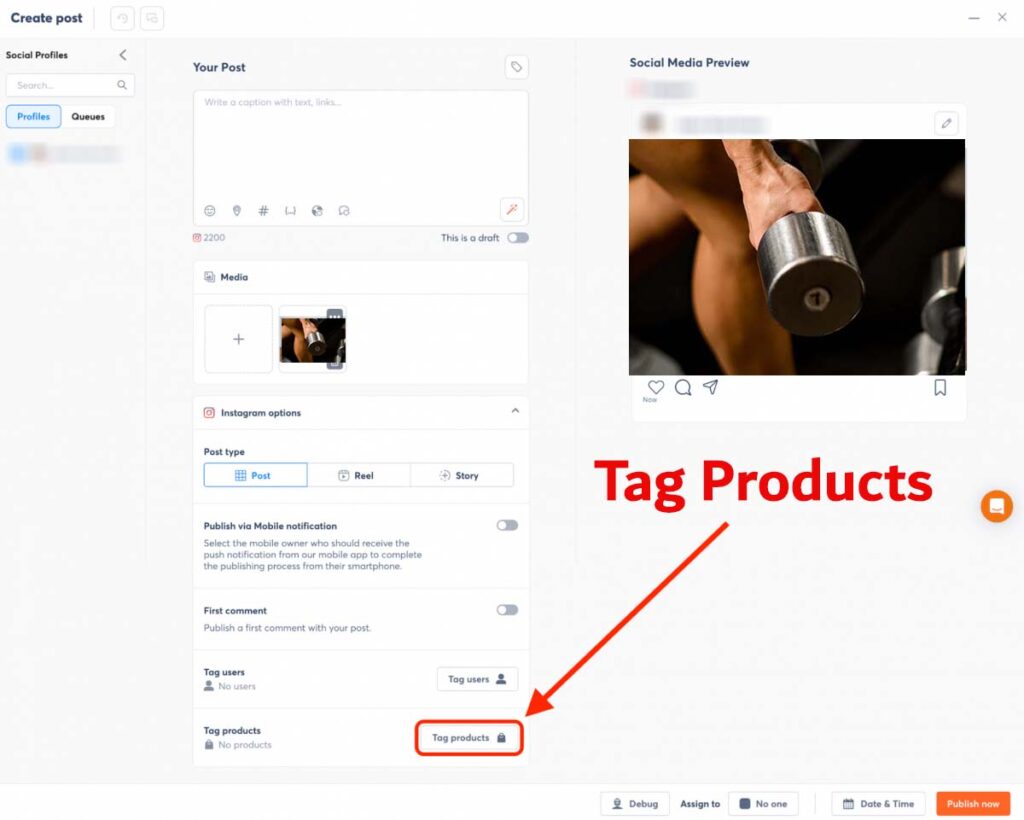
As you can see, setting up an Instagram Shopping is easy with these steps. But you will need more strategy to sell products on Instagram. So, let’s learn some strategies.
Instagram Shopping Strategies to Boost Product Sales
Setting up an Instagram Shop is one thing; selling on Instagram is another. It requires plans and strategies. Here are some tips to sell more on Instagram:
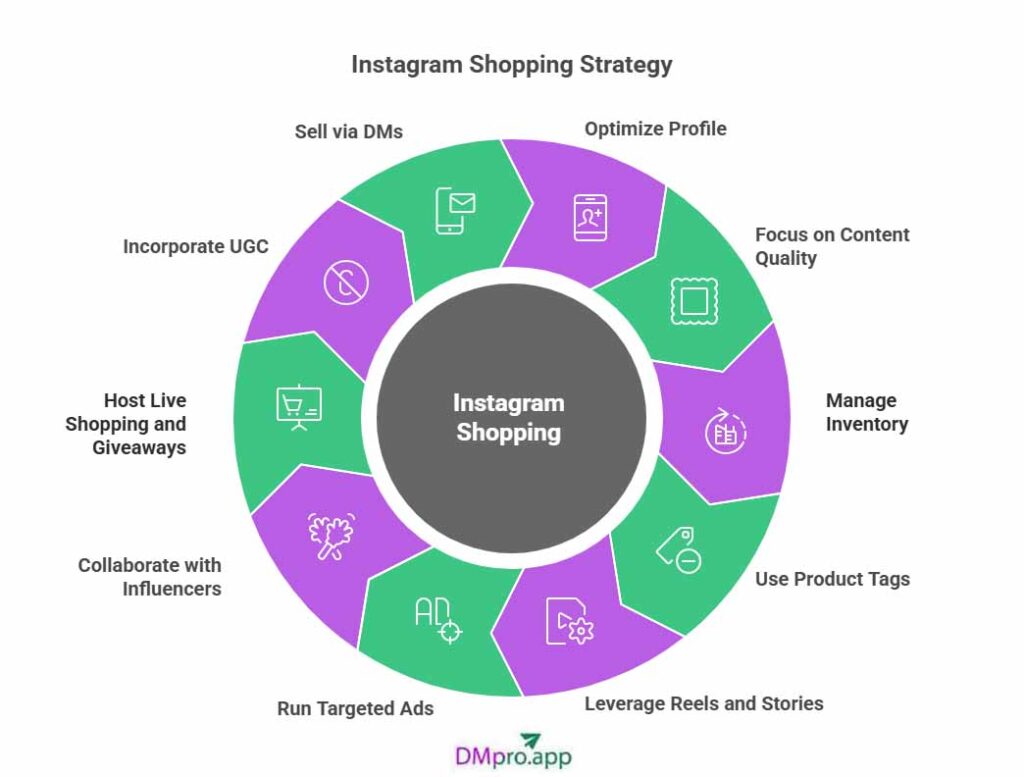
- Optimize Your Profile: Use a clear logo, engaging bio with hashtags and CTAs, and Story highlights for products, FAQs, and reviews. People can’t trust you unless you show them who you are.
- Focus on Content Quality: Choose high-quality images, compelling captions, and relevant hashtags on your product posts. Let them know the benefits of buying that product.
- Manage Your Inventory: Sync catalogs automatically and update stock regularly to avoid errors.
- Use Product Tags Effectively: Tag 1-3 products per post in feeds, Stories, and Reels. Blend tags naturally into visuals for higher engagement.
- Leverage Reels and Stories: Create short demos, tutorials, or UGC in Reels (favored by the algorithm). Use stickers in Stories for polls and countdowns.
- Run Targeted Ads: Use Meta Ads Manager for shopping ads, A/B testing creatives, and retargeting abandoned carts.
- Collaborate with Influencers: Join an influencer marketing platform to find relevant influencers for authentic promotions.
- Host Live Shopping and Giveaways: Go live for demos and Q&A; run promotions to boost engagement.
- Incorporate UGC: Repost customer content to build trust (51% of users trust UGC more).
- Sell via DMs: Use the Instagram DM tools, like DMpro, to manually target potential customers and inform them about the latest product launches or even discounts. Learn how to get clients through Instagram DM outreach.
Conclusion
As a business, it’s always beneficial for you to use all Instagram features, especially Instagram Shopping, which allows you to add products to your posts. You can also use other tools to analyze what sells more on Instagram. Additionally, don’t forget to add influencer marketing to your marketing plans as it can enhance your views, which can lead to more sales.
FAQs
You can sell a wide range of physical products, as long as they comply with Instagram’s commerce policies and community guidelines. However, you should note that Instagram Shopping is limited to physical goods, so you won’t be able to tag services or add any digital product to it.
To promote your Instagram Shop, you can use Instagram ads, collaborate with influencers, share engaging content featuring your products, utilize stories and reels, and engage with your audience to boost visibility.
Yes, all the businesses around the world can use this feature as long as they comply with Instagram guidelines and sell products that are accepted.
Yes, in most cases, you need a website to use the Instagram Shopping feature, as it’s a requirement for setting up a shop and getting approved by Instagram.