How to Turn Off Profile Views on TikTok: A Complete Privacy Guide for 2024
In the dynamic world of TikTok, where content is king, your privacy remains a paramount concern. Whether you’re a casual browser, a rising creator, or simply someone who values digital discretion, you’ve likely wondered about the footprints you leave behind. One of the platform’s most discussed features is Profile View History—the ability to see who has visited your profile and, in turn, be seen by others. If you’re seeking to browse anonymously, enhance your account security, or simply take control of your digital trace, this comprehensive guide will walk you through three easy methods to turn off profile views on TikTok in 2024. We’ll also delve into the crucial implications of this decision, helping you weigh the pros and cons to make the best choice for your TikTok journey.
Understanding TikTok’s Profile View Feature
Before adjusting your settings, it’s essential to understand what the profile view feature entails. When enabled, it allows you to see a list of users who have viewed your TikTok profile within the last 30 days, provided they also have the feature turned on. This creates a mutual transparency—you see them, and they see you. While this can foster connections and engagement for some, for others, it represents an unwanted layer of exposure. Disabling this feature is a powerful step toward anonymous browsing and enhanced privacy on one of the world’s most popular social platforms.
Method 1: How to Disable Profile Views Directly From Your Profile
This is the most straightforward and fastest method, taking you directly to the setting in just a few taps.
- Open the TikTok app and navigate to your profile page by tapping the “Me” icon in the bottom right corner.
- At the top of your profile, locate and tap the footprint icon. This is your direct gateway to profile view management.
- On the next screen, tap the gear (settings) icon in the top right corner to access the specific toggle for this feature.
- Simply toggle the switch for ‘Profile View History’ to the off position. A confirmation pop-up may appear; confirm your choice.
This action is immediate. Your existing view history will be cleared, and you will stop appearing in others’ lists.
Method 2: Turning Off Profile Views Via Settings and Privacy
For those who prefer navigating through the app’s central settings menu, this method provides a reliable alternative.
- From your profile, tap the hamburger menu (three lines) in the top right corner.
- Select ‘Settings and Privacy’ from the menu that appears.
- Within settings, tap on the ‘Privacy’ section.
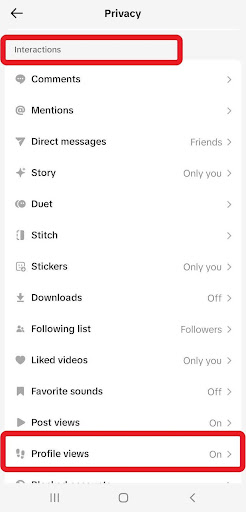
- Scroll down to the ‘Interactions’ category and select ‘Profile Views.’
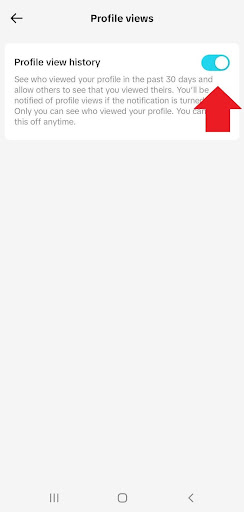
- On the Profile Views page, toggle the ‘Profile View History’ setting off.
This path is excellent if you’re already in the settings adjusting other privacy options, such as comment filters or duet permissions.
Method 3: Disabling the Feature From Your Inbox
While less direct, this method can be useful if you’ve recently received a profile view notification and want to act on it immediately.
- Tap the ‘Inbox’ icon on the TikTok bottom navigation bar (next to the “+” icon).
- Switch to the ‘Activity’ tab within your inbox.
- Locate a notification related to a profile view—it may say “[Username] viewed your profile.”
- Tap on this notification or find a ‘Profile Views’ header to access the history page.
- Once there, tap the gear icon and toggle ‘Profile View History’ off.
The Immediate Consequences: What Happens When You Turn It Off
Making this change has instant and specific effects on your account’s functionality and visibility. It’s crucial to understand these outcomes before proceeding.
- Your View History is Cleared: Your list of recent profile visitors will be permanently deleted.
- You Become Invisible: You will no longer appear in the profile view history of any account you visit.
- You Lose Insight: You will no longer be able to see which accounts have viewed your profile.
- The Change is Mutual: This setting respects privacy both ways. If you have it off, you cannot see others, and they cannot see you, creating a level playing field of anonymity.
Should You Turn Off Your TikTok Profile Views? A Strategic Analysis
The decision to disable profile views is not one-size-fits-all. It depends heavily on your goals, content strategy, and personal comfort level. Let’s break down the advantages and disadvantages to inform your choice.
The Benefits of a Private Browsing Experience
Choosing to turn off profile view history offers several compelling advantages, particularly for personal account holders and privacy-conscious users.
- Enhanced Privacy and Security: This is the foremost benefit. It prevents unwanted followers or individuals from knowing you’ve viewed their profile, which can be a proactive measure against potential harassment or stalking. It’s a powerful tool for maintaining personal boundaries without resorting to blocking.
- Stress-Free Browsing: You can explore competitor content, exes’ profiles, or any account without the social pressure of being “seen.” This allows for genuine curiosity and research without leaving a digital trail.
- Control Over Your Digital Footprint: In an era of data awareness, controlling what information you share is empowering. Disabling this feature is a conscious choice to share less metadata about your browsing habits.
The Potential Drawbacks for Creators and Networkers
For users leveraging TikTok for growth, networking, or business, turning off this feature may present some challenges.
- Limited Audience Insights: For creators, profile views are a valuable, albeit basic, analytics metric. They can indicate interest beyond likes or comments. Losing this data means one less tool to understand who is engaging with your brand at a passive level.
- Reduced Reciprocal Engagement: Some community growth is driven by mutual recognition. A user seeing that you viewed their profile might be encouraged to check out your content in return. Disabling views removes this potential catalyst for connection.
- Missed Collaboration Opportunities: Brands or fellow creators who notice you’ve viewed their profile might reach out for partnerships. Anonymity, while safe, can sometimes close a door to spontaneous professional opportunities.
In summary, if your account is primarily for personal use or privacy is your top priority, turning the feature off is highly recommended. Conversely, if you are a public creator, influencer, or business focused on growth and analytics, keeping it on may provide more strategic value.
How to Re-Enable Profile View History on TikTok
Privacy needs and strategies evolve. If you decide to turn your profile view history back on, the process is simple and mirrors the disable methods.
- Navigate to your profile and tap the footprint icon.
- If the feature is off, you will see a prominent ‘Turn On’ button. Tapping it will immediately re-enable the feature.
- Alternatively, go through Settings and Privacy > Privacy > Profile Views and toggle the setting on.
Important Note: When you turn the feature back on, you will only start collecting view data from that point forward. Your previous history will not be restored.
Advanced Privacy Considerations for the Modern TikTok User
Managing your profile views is just one component of a robust TikTok privacy strategy. To create a comprehensive shield, consider these complementary actions:
- Set Your Account to Private: This is the most definitive step. A private account means you approve all followers, and your content is only visible to them.
- Manage Your Activity Status: You can turn off your “active status” in the privacy settings to prevent others from seeing when you were last online.
- Curate Your Interactions: Use the “Liked videos” privacy setting to control who can see the content you’ve liked, and employ comment filters to manage your conversations.
- Regularly Review Linked Apps: Periodically check which third-party applications have access to your TikTok data and revoke permissions for those you no longer use.
Conclusion: Taking Command of Your TikTok Experience
In the bustling ecosystem of TikTok, where visibility often feels synonymous with success, choosing anonymity is a powerful assertion of control. Disabling your Profile View History is a simple yet profound setting that prioritizes your comfort and security. As we’ve outlined through three clear methods, the process is designed to be accessible for every user.
Weigh the trade-offs carefully: the peace of mind and privacy against the potential loss of audience insight and networking cues. Your decision should align with your fundamental goals for using the platform. Remember, privacy settings are not permanent; you can adapt them as your needs change. By taking charge of this feature today, you are taking a crucial step toward crafting a TikTok experience that truly works for you—whether you’re in the spotlight or enjoying the show from the shadows.
✨ Enhanced Content ✨
Are you a TikToker looking for more privacy? Or perhaps you enjoy browsing profiles anonymously. If so, you might be wondering how to turn off profile views on TikTok.
Disabling profile views can also keep stalkers away from your account so you don’t have to block someone on TikTok.
Good news! You can easily disable your profile view history from your profile settings. Let’s explore three ways to do this. Don’t worry! We’ll also discuss the pros and cons of turning off your TikTok profile views.
How to Turn Off Profile Views on TikTok on Android & iPhone
Here’s a step-by-step guide on how to switch off your profile view history on TikTok.
1. From Your Profile
The easiest and fastest way to disable your profile view history is through your profile. Here’s how to turn profile views off on TikTok from your profile:
- Go to your profile and tap the footprint icon at the top.
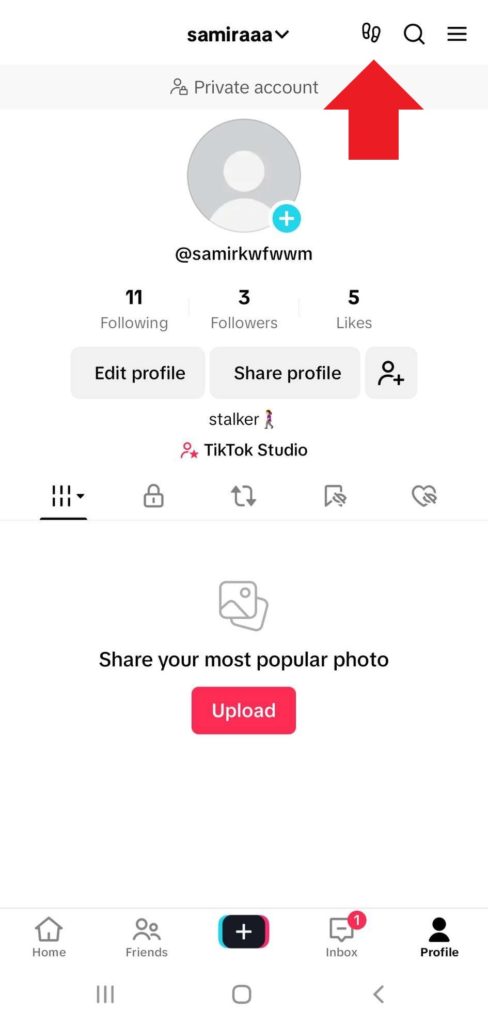
2. Next, tap the gear icon at the top right corner.
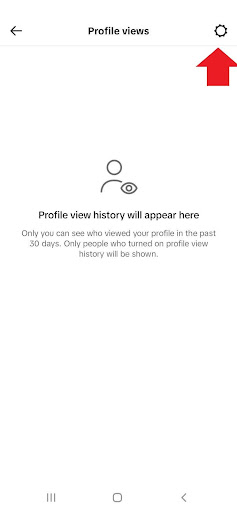
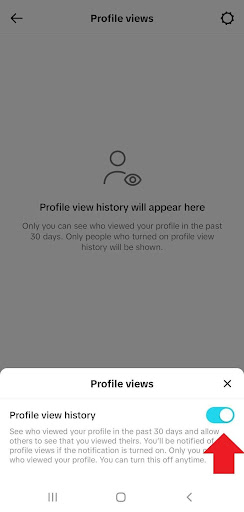
3. Now, toggle ‘Profile View History’ off.
2. From “Settings and Privacy”
Now, we’ll walk you through the steps to turn off your TikTok profile views from ‘Settings and Privacy’.
- Head over to your profile, tap the hamburger icon at the top right corner, and open ‘Settings and Privacy’.
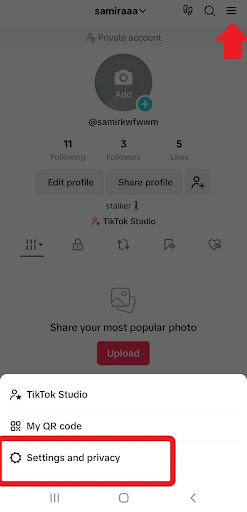
2. Next, tap ‘Privacy’.
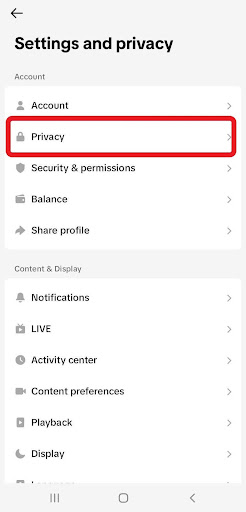
3. Scroll down to ‘Interactions’ and tap ‘Profile Views’.
4. Finally, turn ‘Profile View History’ off.
3. From Your Inbox
Here’s how to turn off profile views on TikTok from your inbox (a less straightforward way):
- Open the app and tap ‘Inbox’ next to (+).
- Next, tap ‘Activity’.
- Find a profile view notification and open it or tap ‘Profile Views’.
- Then, tap the gear icon and turn off the ‘Profile View History’.
What Happens When You Turn Off Profile View History on TikTok?
Before turning off your profile view on TikTok, it’s helpful to understand the consequences. Let’s explore what might happen:
- You will no longer be able to see the list of accounts that have viewed your profile within the last 30 days.
- Other accounts can’t also see if you’ve viewed their profile.
- Your profile views history will be cleared.
- Your account is removed from other users’ lists.
Should I Turn Off My TikTok Profile Views?
Whether you keep your TikTok profile views on or off is up to you. We’ve weighed the pros and cons so you can decide what’s best for you:
Benefits of Turning Off Profile Views on TikTok
First, let’s discuss the potential benefits of disabling TikTok profile view history:
- For personal accounts, it means a higher level of privacy on TikTok and avoiding unwanted interactions. If you don’t want to block someone on TikTok, you can try this one!
- You don’t have to worry about others knowing when you’ve viewed their profiles.
- You can keep anonymous browsing on TikTok!
Drawbacks of Turning Off Profile Views on TikTok
On the other hand, turning off your profile views on TikTok might have these drawbacks:
- Limited Insights: You can’t track who has viewed your profile so you’ll lose valuable information about your audience.
- Reduced Engagement: Some users might be less likely to engage with your content if they don’t know you’ve viewed theirs.
- Lost Opportunities: You might miss out on potential connections or collaborations.
In short, if you’re a content creator who relies on audience insights, it’s recommended to keep your TikTok profile view history on. But if privacy is your main concern, feel free to turn it off.
How to Turn On Profile Views on TikTok?
You learned how to turn off profile views on TikTok. What if you change your mind and want to turn it on? Here’s how to turn on your profile view history on TikTok:
- Go to your profile and tap the footprint icon at the top.
2. Just tap ‘Turn on’ and it’s done!
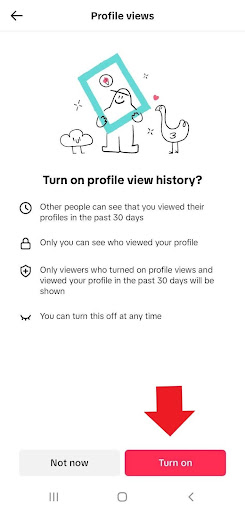
You can also enable your TikTok profile view through Settings and Privacy. Just follow these steps:
- Visit your profile and tap the hamburger icon at the top corner.
- Open ‘Settings and Privacy’ and click ‘Privacy’.
- Under ‘Interactions’, tap ‘Profile Views’.
- Finally, turn ‘Profile View History’ on.
Wrap Up
Now that you know how to turn off profile views on TikTok, you can take control of your privacy and browse anonymously. Remember, the TikTok profile views feature only works for public accounts. In addition, you can only see if someone has viewed your profile if they have also enabled the feature. It’s similar to an activity status.
FAQs
Let’s answer some FAQs about how to turn off profile views on TikTok:
1. What Is “Profile Views” on TikTok?
Profile Views is a TikTok feature that allows you to track which accounts have viewed your profile within the last 30 days. However, you’ll only see the profiles of users who have enabled the Profile Views feature for themselves in your own Profile Views list.
2. How to Turn Off Your Profile Views on TikTok?
You can try one of the following methods to turn off your profile views on TikTok:
- Go to your profile, tap the footprint icon on top, click the gear icon at the top corner, and turn ‘Profile View History’ off.
- From your profile, tap the hamburger icon on the top to open ‘Settings and Privacy’. Tap ‘Privacy’ and under ‘Interactions’, select ‘Profile Views’ and toggle ‘Profile View History’ off.
- Go to your ‘Inbox’ and open ‘Activity’. First, tap a profile view notification and then, ‘Profile Views’. Finally, switch Profile View History’ off.
3. How to Turn Off Profile Views on TikTok on the Computer?
Unfortunately, you can’t turn the profile views on or off on the TikTok desktop. The feature is only available on the TikTok app for both Android and iPhone devices.
4. Does TikTok Notify When You View Someone’s Profile?
Yes, TikTok will send notifications when you view someone’s profile, but only if that person has enabled notifications for profile views.
5. If You Turn on Profile Views on TikTok and Then Turn It Off, Will They Know?
If you have your TikTok profile view history enabled, view someone’s profile, and then turn it off, you’ll disappear from their views list.
6. Do Private TikTok Accounts Have Profile Views?
No, TikTok profile view history is only available for public accounts.
[elementor-template id="24702"]