How to Turn Off Profile Views on TikTok: A Complete Privacy Guide for 2024
In the dynamic world of TikTok, where content is king, your privacy remains a paramount concern. Whether you’re a casual browser, a rising creator, or simply someone who values digital discretion, you’ve likely wondered about the footprints you leave behind. One of the platform’s most discussed features is Perfil Ver historial—the ability to see who has visited your profile and, in turn, be seen by others. If you’re seeking to browse anonymously, enhance your account security, or simply take control of your digital trace, this comprehensive guide will walk you through three easy methods to turn off profile views on TikTok in 2024. We’ll also delve into the crucial implications of this decision, helping you weigh the pros and cons to make the best choice for your TikTok journey.
Understanding TikTok’s Profile View Feature
Before adjusting your settings, it’s essential to understand what the profile view feature entails. When enabled, it allows you to see a list of users who have viewed your TikTok profile within the last 30 days, provided they also have the feature turned on. This creates a mutual transparency—you see them, and they see you. While this can foster connections and engagement for some, for others, it represents an unwanted layer of exposure. Disabling this feature is a powerful step toward anonymous browsing and enhanced privacy on one of the world’s most popular social platforms.
Method 1: How to Disable Profile Views Directly From Your Profile
This is the most straightforward and fastest method, taking you directly to the setting in just a few taps.
- Open the TikTok app and navigate to your profile page by tapping the “Me” icon in the bottom right corner.
- At the top of your profile, locate and tap the icono de huella. This is your direct gateway to profile view management.
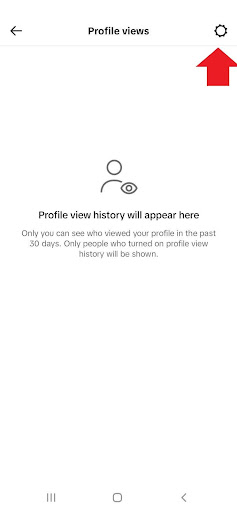
- On the next screen, tap the gear (settings) icon in the top right corner to access the specific toggle for this feature.
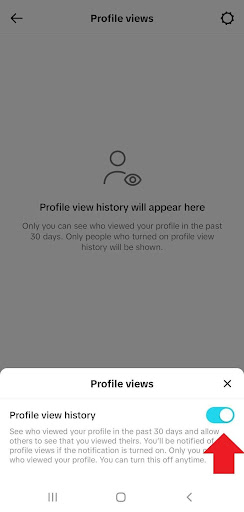
- Simply toggle the switch for ‘Profile View History’ to the off position. A confirmation pop-up may appear; confirm your choice.
This action is immediate. Your existing view history will be cleared, and you will stop appearing in others’ lists.
Method 2: Turning Off Profile Views Via Settings and Privacy
For those who prefer navigating through the app’s central settings menu, this method provides a reliable alternative.
- Desde su perfil, pulse el botón hamburger menu (three lines) in the top right corner.
- Seleccione ‘Settings and Privacy’ from the menu that appears.
- Within settings, tap on the ‘Privacy’ sección.
- Scroll down to the ‘Interactions’ category and select ‘Profile Views.’
- On the Profile Views page, toggle the ‘Profile View History’ setting off.
This path is excellent if you’re already in the settings adjusting other privacy options, such as comment filters or duet permissions.
Method 3: Disabling the Feature From Your Inbox
While less direct, this method can be useful if you’ve recently received a profile view notification and want to act on it immediately.
- Tap the ‘Inbox’ icon on the TikTok bottom navigation bar (next to the “+” icon).
- Switch to the ‘Activity’ tab within your inbox.
- Locate a notification related to a profile view—it may say “[Username] viewed your profile.”
- Tap on this notification or find a ‘Profile Views’ header to access the history page.
- Once there, tap the icono de engranaje and toggle ‘Profile View History’ off.
The Immediate Consequences: What Happens When You Turn It Off
Making this change has instant and specific effects on your account’s functionality and visibility. It’s crucial to understand these outcomes before proceeding.
- Your View History is Cleared: Your list of recent profile visitors will be permanently deleted.
- You Become Invisible: You will no longer appear in the profile view history of any account you visit.
- You Lose Insight: You will no longer be able to see which accounts have viewed your profile.
- The Change is Mutual: This setting respects privacy both ways. If you have it off, you cannot see others, and they cannot see you, creating a level playing field of anonymity.
Should You Turn Off Your TikTok Profile Views? A Strategic Analysis
The decision to disable profile views is not one-size-fits-all. It depends heavily on your goals, content strategy, and personal comfort level. Let’s break down the advantages and disadvantages to inform your choice.
The Benefits of a Private Browsing Experience
Choosing to turn off profile view history offers several compelling advantages, particularly for personal account holders and privacy-conscious users.
- Enhanced Privacy and Security: This is the foremost benefit. It prevents unwanted followers or individuals from knowing you’ve viewed their profile, which can be a proactive measure against potential harassment or stalking. It’s a powerful tool for maintaining personal boundaries without resorting to blocking.
- Stress-Free Browsing: You can explore competitor content, exes’ profiles, or any account without the social pressure of being “seen.” This allows for genuine curiosity and research without leaving a digital trail.
- Control Over Your Digital Footprint: In an era of data awareness, controlling what information you share is empowering. Disabling this feature is a conscious choice to share less metadata about your browsing habits.
The Potential Drawbacks for Creators and Networkers
For users leveraging TikTok for growth, networking, or business, turning off this feature may present some challenges.
- Limited Audience Insights: For creators, profile views are a valuable, albeit basic, analytics metric. They can indicate interest beyond likes or comments. Losing this data means one less tool to understand who is engaging with your brand at a passive level.
- Reduced Reciprocal Engagement: Some community growth is driven by mutual recognition. A user seeing that you viewed their profile might be encouraged to check out your content in return. Disabling views removes this potential catalyst for connection.
- Missed Collaboration Opportunities: Brands or fellow creators who notice you’ve viewed their profile might reach out for partnerships. Anonymity, while safe, can sometimes close a door to spontaneous professional opportunities.
In summary, if your account is primarily for personal use or privacy is your top priority, turning the feature off is highly recommended. Conversely, if you are a public creator, influencer, or business focused on growth and analytics, keeping it on may provide more strategic value.
How to Re-Enable Profile View History on TikTok
Privacy needs and strategies evolve. If you decide to turn your profile view history back on, the process is simple and mirrors the disable methods.
- Navigate to your profile and tap the icono de huella.
- If the feature is off, you will see a prominent ‘Turn On’ button. Tapping it will immediately re-enable the feature.
- Alternatively, go through Settings and Privacy > Privacy > Profile Views and toggle the setting on.
Important Note: When you turn the feature back on, you will only start collecting view data from that point forward. Your previous history will not be restored.
Advanced Privacy Considerations for the Modern TikTok User
Managing your profile views is just one component of a robust TikTok privacy strategy. To create a comprehensive shield, consider these complementary actions:
- Set Your Account to Private: This is the most definitive step. A private account means you approve all followers, and your content is only visible to them.
- Manage Your Activity Status: You can turn off your “active status” in the privacy settings to prevent others from seeing when you were last online.
- Curate Your Interactions: Use the “Liked videos” privacy setting to control who can see the content you’ve liked, and employ comment filters to manage your conversations.
- Regularly Review Linked Apps: Periodically check which third-party applications have access to your TikTok data and revoke permissions for those you no longer use.
Conclusion: Taking Command of Your TikTok Experience
In the bustling ecosystem of TikTok, where visibility often feels synonymous with success, choosing anonymity is a powerful assertion of control. Disabling your Perfil Ver historial is a simple yet profound setting that prioritizes your comfort and security. As we’ve outlined through three clear methods, the process is designed to be accessible for every user.
Weigh the trade-offs carefully: the peace of mind and privacy against the potential loss of audience insight and networking cues. Your decision should align with your fundamental goals for using the platform. Remember, privacy settings are not permanent; you can adapt them as your needs change. By taking charge of this feature today, you are taking a crucial step toward crafting a TikTok experience that truly works for you—whether you’re in the spotlight or enjoying the show from the shadows.
✨ Enhanced Content ✨
¿Eres un TikToker que busca más privacidad? O tal vez te gusta navegar por los perfiles de forma anónima. Si es así, puede que te preguntes cómo desactivar las vistas de perfil en TikTok.
Desactivar las vistas de perfil también puede mantener a los acosadores alejados de tu cuenta para que no tengas que bloquear a alguien en TikTok.
Buenas noticias. Puedes desactivar fácilmente el historial de vistas de tu perfil desde la configuración del mismo. Veamos tres formas de hacerlo. No te preocupes. También discutiremos los pros y los contras de desactivar tus vistas de perfil de TikTok.
Cómo desactivar las vistas de perfil en TikTok en Android y iPhone
Aquí tienes una guía paso a paso sobre cómo desactivar el historial de vistas de tu perfil en TikTok.
1. Desde su perfil
La forma más fácil y rápida de desactivar el historial de vistas de perfil es a través de tu perfil. Aquí te explicamos cómo desactivar las vistas de perfil en TikTok desde tu perfil:
- Vaya a su perfil y pulse el botón icono de huella en la parte superior.
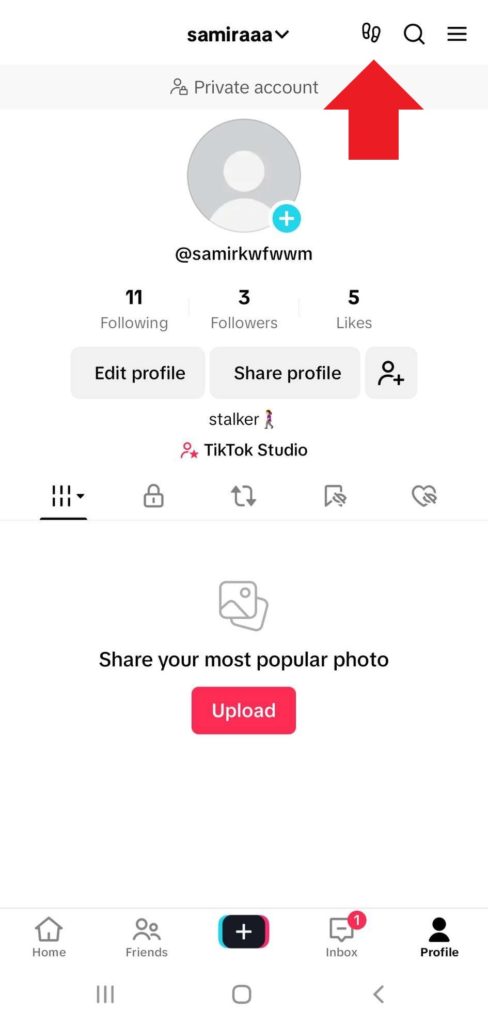
2. A continuación, pulse el botón icono de engranaje en la esquina superior derecha.
3. Ahora, activa ‘Perfil Ver historial’Fuera.
2. Desde “Configuración y privacidad”
Ahora, te guiaremos a través de los pasos para desactivar las vistas de tu perfil de TikTok desde ‘Configuración y Privacidad’.
- Ve a tu perfil, toca el icono de la hamburguesa en la esquina superior derecha y abre ‘Configuración y privacidad’.
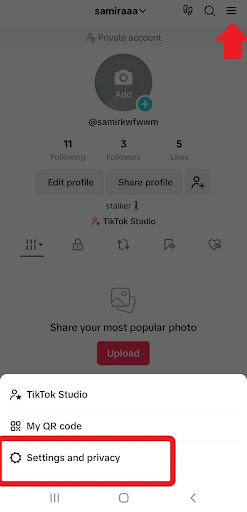
2. A continuación, pulse ‘Privacidad’.
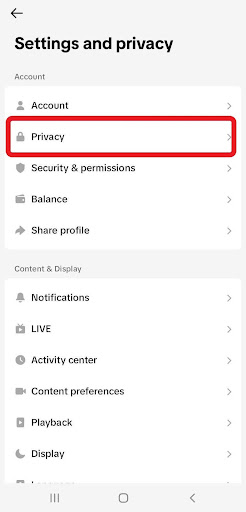
3. Desplácese hasta ‘Interacciones’ y pulse ‘Vistas del perfil’.
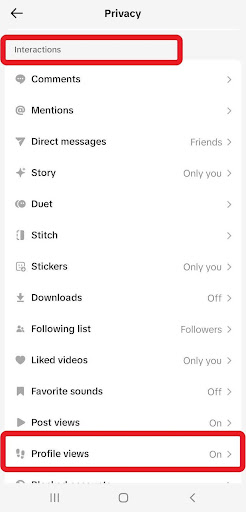
4. Por último, gire ‘Perfil Ver historial’ off.
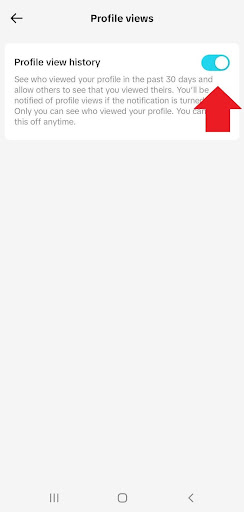
3. Desde su bandeja de entrada
Aquí tienes cómo desactivar las vistas de perfil en TikTok desde tu bandeja de entrada (una forma menos directa):
- Abre la aplicación y pulsa ‘Bandeja de entrada’junto a (+).
- A continuación, pulse ‘Actividad’.
- Busca una notificación de vista de perfil y ábrela o pulsa ‘Vistas del perfil’.
- A continuación, toca el icono del engranaje y desactiva la opción ‘Perfil Ver historial’.
¿Qué sucede cuando desactivas el historial de vista de perfil en TikTok?
Antes de desactivar la vista de tu perfil en TikTok, es útil entender las consecuencias. Vamos a explorar lo que podría suceder:
- Ya no podrás ver la lista de cuentas que han visto tu perfil en los últimos 30 días.
- Otras cuentas tampoco pueden ver si has visto su perfil.
- Se borrará el historial de vistas de tu perfil.
- Tu cuenta se elimina de las listas de otros usuarios.
¿Debo desactivar las vistas de mi perfil de TikTok?
Mantener activadas o desactivadas las vistas de tu perfil de TikTok depende de ti. Hemos sopesado los pros y los contras para que puedas decidir qué es lo mejor para ti:
Ventajas de desactivar las vistas de perfil en TikTok
En primer lugar, vamos a discutir los beneficios potenciales de la desactivación de TikTok perfil ver la historia:
- Para las cuentas personales, significa un mayor nivel de privacidad en TikTok y evitar interacciones no deseadas. Si no desea bloquear a alguien en TikTok, ...¡puedes probar éste!
- No tienes que preocuparte de que los demás sepan cuándo has visto sus perfiles.
- Puede conservar navegación anónima en TikTok!
Inconvenientes de desactivar las vistas de perfil en TikTok
Por otro lado, desactivar las vistas de tu perfil en TikTok puede tener estos inconvenientes:
- Perspectivas limitadas: No puedes hacer un seguimiento de quién ha visto tu perfil, por lo que perderás información valiosa sobre tu audiencia.
- Compromiso reducido: Es posible que algunos usuarios se sientan menos atraídos por tus contenidos si no saben que has visto los suyos.
- Oportunidades perdidas: Podrías perderte posibles contactos o colaboraciones.
En resumen, si eres un creador de contenido que depende de la audiencia, se recomienda mantener el historial de vistas de tu perfil de TikTok activado. Pero si tu principal preocupación es la privacidad, no dudes en desactivarlo.
¿Cómo activar las vistas de perfil en TikTok?
Has aprendido a desactivar las vistas de perfil en TikTok. ¿Y si cambias de opinión y quieres activarlas? Aquí te explicamos cómo activar el historial de vistas de perfil en TikTok:
- Ve a tu perfil y toca el icono de la huella en la parte superior.
2. Sólo tienes que pulsar ‘Encender’ y ¡listo!
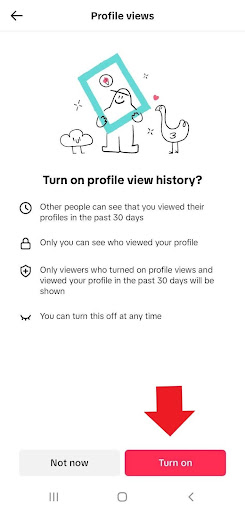
También puedes habilitar la vista de tu perfil de TikTok a través de Ajustes y Privacidad. Sólo tienes que seguir estos pasos:
- Visita tu perfil y toca el icono de la hamburguesa en la esquina superior.
- Abrir ‘Configuración y privacidad’y haz clic en ‘Privacidad’.
- Bajo ‘Interacciones’, pulse ‘Vistas del perfil’.
- Por último, gire ‘Perfil Ver historial’ en.
Resumen
Ahora que sabes cómo desactivar las vistas de perfil en TikTok, puedes tomar el control de tu privacidad y navegar anónimamente. Recuerda que la función de ver perfil de TikTok sólo funciona para cuentas públicas. Además, sólo puedes ver si alguien ha visto tu perfil si también ha habilitado la función. Es similar a un estado de actividad.
Preguntas frecuentes
Vamos a responder a algunas preguntas frecuentes sobre cómo desactivar las vistas de perfil en TikTok:
1. Qué es “Vistas de perfil” en TikTok?
Vistas de Perfil es una función de TikTok que te permite saber qué cuentas han visto tu perfil en los últimos 30 días. Sin embargo, sólo verás los perfiles de los usuarios que han habilitado la función de Vistas de Perfil para sí mismos en tu propia lista de Vistas de Perfil.
2. Cómo desactivar las vistas de tu perfil en TikTok?
Puedes probar uno de los siguientes métodos para desactivar las vistas de tu perfil en TikTok:
- Vaya a su perfil, pulse el botón icono de huella en la parte superior, haga clic en el botón icono de engranaje en la esquina superior, y gire ‘Perfil Ver historial’ off.
- Desde su perfil, pulse el botón icono de hamburguesa en la parte superior para abrir ‘Configuración y privacidad’. Toque ‘Privacidad’y bajo‘Interacciones’, seleccione ‘Vistas del perfil’y activar ‘Perfil Ver historial’Fuera.
- Ve a tu ‘Bandeja de entrada’ y abre ‘Actividad’. En primer lugar, pulse una notificación de vista de perfil y, a continuación, ‘Vistas del perfil’. Por último, cambie Perfil Ver historial’Fuera.
3. Cómo desactivar las vistas de perfil en TikTok en el ordenador?
Desafortunadamente, no puedes activar o desactivar las vistas de perfil en el escritorio de TikTok. La función solo está disponible en la aplicación de TikTok para dispositivos Android y iPhone.
4. ¿Notifica TikTok cuando ves el perfil de alguien?
Sí, TikTok enviará notificaciones cuando veas el perfil de alguien, pero sólo si esa persona ha habilitado las notificaciones para las vistas de perfil.
5. Si activas las vistas de perfil en TikTok y luego las desactivas, ¿lo sabrán?
Si tienes activado el historial de vistas de tu perfil de TikTok, ves el perfil de alguien y luego lo desactivas, desaparecerás de su lista de vistas.
6. Las cuentas privadas de TikTok, ¿tienen vistas de perfil?
No, el historial de vistas de perfil de TikTok sólo está disponible para cuentas públicas.
[elementor-template id="24702"]