Qué significa Nudge en TikTok y cómo usarlo en 2024
In the ever-evolving landscape of TikTok, new features constantly emerge to reshape how we connect and communicate. One such feature, “Nudge,” has sparked curiosity and confusion since its rollout. While not yet universally available, it represents a significant shift in passive and active engagement on the platform. If you’ve found yourself wondering about its purpose or fumbling to find the button, you’re not alone. This guide will demystify the TikTok Nudge feature for 2024, providing a comprehensive look at its meaning, practical applications, and strategic value. Moving beyond basic functionality, we’ll explore how this tool fits into the broader context of digital communication, offering both opportunities for connection and considerations for respectful use.
Principales conclusiones
- Nudge is a digital tap on the shoulder: It’s a feature to attract attention or send a reminder via a special notification, functioning similarly to Facebook’s classic “Poke.”
- Dual functionality: You can nudge favorite creators to request a Live session or nudge friends to initiate a conversation.
- Limited availability: The creator-nudge capability is still in a phased rollout and is not accessible to all users or creators.
- Actionable insights: Understanding how to use and manage this feature can enhance your engagement strategy and control over your TikTok experience.
Decoding the TikTok Nudge: More Than Just a Poke
At its core, the Nudge feature on TikTok is a lightweight, intent-based notification. It allows users to non-verbally signal to another user—be it a content creator or a friend—that they are seeking their attention. This could be to express a desire for them to go live, to gently prompt a reply to a message, or simply to say “hey” in a low-pressure way.
The genius of Nudge lies in its simplicity and ambiguity. Unlike a comment or direct message that demands linguistic effort and a specific response, a nudge is an open-ended gesture. This reduces the social friction of initiating contact, especially with creators who have large audiences. For the recipient, it serves as a metric of passive demand, indicating viewer or follower interest without the noise of a full comment section.
Important Note: The feature’s rollout has been gradual. Therefore, if you don’t see the option, it’s likely not yet available to your account or the account you wish to interact with. This staggered release is common for TikTok as it tests and optimizes new social tools.
Step-by-Step: How to Nudge on TikTok in 2024
The method to nudge differs slightly depending on your relationship to the account. Below, we break down the two primary pathways.
How to Nudge a Content Creator on TikTok
Nudging a creator is specifically designed as a live-stream request mechanism. It’s a way for fans to collectively signal to a creator that there’s an audience waiting for real-time interaction. To send a nudge to a creator:
- Navigate to the profile page of the creator you follow.
- Tap the bell icon (🔔) typically located near the “Follow” or “Message” button.
- This opens their Ajustes de notificación menu. If the feature is available to you, you will see a “Dé un codazo a” option among the toggles for post, live, and story alerts.
- Tap “Dé un codazo a” to send your request. The creator will receive a notification that followers are nudging them to go live.
Consejo profesional: This is not a one-to-one nudge. It aggregates interest, so a creator might see “You have been nudged by [X] followers” rather than individual names, depending on their settings and the volume of nudges.
How to Nudge a Friend or Follower on TikTok
This function operates more like a direct, interpersonal ping within your social circle. It’s perfect for rekindling a conversation or playfully getting a friend’s attention. Here’s how it works:
- Visit the profile of the friend or follower you wish to nudge.
- Look for the “Enviar un 👋” button, often found in place of or near the “Message” button if you are already connected.
- Tapping this sends a initial “wave” sticker in your direct message thread with that person.
- Immediately after sending the wave, a “Dé un codazo a” button will appear. Tap it to send a follow-up nudge notification to that user, reminding them of your message.
This two-step process (Wave + Nudge) is intentional—it provides a friendly opening before applying the slight pressure of a nudge reminder.
The Strategic Impact: Advantages and Disadvantages of Nudging
Like any social feature, nudging comes with its own set of potentials and pitfalls. A thoughtful user understands both sides to employ the tool effectively and ethically.
Advantages of the Nudge Feature
- Low-Effort, High-Intent Engagement: For viewers, it’s a one-tap way to express a specific desire (e.g., “We want a Live!”) without crafting a plea in the comments. For creators, it provides clear, actionable feedback on audience demand.
- Edificio comunitario: When creators respond to nudges by going live, it fosters a powerful sense of community and responsiveness. Followers feel heard, which strengthens loyalty and boosts real-time engagement metrics.
- Comunicación racionalizada: Between friends, it solves the “seen but forgotten” DM problem. The nudge acts as a polite follow-up, ensuring important or fun conversations don’t get lost in the inbox.
Disadvantages and Considerations
- Potential for Spam and Harassment: The simplicity of the feature can be abused. Malicious users might repeatedly nudge a creator or individual, leading to notification fatigue and discomfort. TikTok’s community guidelines still apply, but the feature’s design requires user responsibility.
- Creator Pressure: While intended as positive feedback, a high volume of nudges could feel demanding or stressful for creators, implying an obligation to perform on demand.
- Ambiguity: The nudge lacks context. A recipient might not know why they are being nudged—for a live, for a chat, or just for fun—which could lead to confusion rather than the intended connection.
Managing Your Nudge Experience: Privacy and Control
TikTok provides controls for users to manage how they interact with the nudge feature, which is crucial for maintaining a positive experience on the platform.
How to Disable Nudges (For Creators)
If you are a creator and find the nudge feature distracting or prefer to set your own live stream schedule, you can disable it:
- Access your Creator Tools via your profile settings.
- Find and select the “Dé un codazo a” settings option.
- Toggle off “Permita que los espectadores le empujen“.
This will remove the nudge option from your followers’ notification menus, giving you full control over this channel of feedback.
What to Do If You Can’t Find the Nudge Button
If the option is absent, the reasons are typically straightforward:
- Phased Rollout: The feature is likely not yet available in your region or to your account tier.
- Creator Disabled It: The specific creator you wish to nudge has turned the feature off in their settings.
- Platform Limitation: The nudge feature is exclusive to the TikTok mobile app. It is not available on the desktop version.
Nudge on TikTok: Frequently Asked Questions (FAQs)
1. What’s the difference between nudging a creator and a friend?
Nudging a creator is primarily a collective live-stream request tool, while nudging a friend is a direct, one-to-one reminder attached to your message thread.
2. Will someone know if I nudge them?
Sí. The recipient receives a clear notification that they have been nudged, though it may not specify your individual username if you are nudging as part of a group of followers to a creator.
3. Is nudging considered spam?
Used occasionally and with positive intent, it is a legitimate feature. However, repeated, unwanted nudging can constitute spammy behavior and may be reported under TikTok’s community guidelines concerning harassment.
4. Can I undo a nudge?
No, once sent, a nudge cannot be retracted. The notification is delivered instantly.
5. How is “Nudge” different from “Poke” on Facebook?
While conceptually similar as lightweight attention signals, TikTok’s Nudge has more defined use cases (Live requests, message reminders). Facebook’s Poke is often more open-ended and social-game oriented.
Conclusion: Nudging Your Way to Better Engagement
The TikTok Nudge feature, in its elegant simplicity, encapsulates the platform’s drive towards more intuitive and layered social interactions. It is more than a digital relic like the “poke”; it is a functional tool for audience feedback and personal connection. For viewers and friends, it offers a voice to request engagement. For creators, it provides valuable, aggregated insight into follower demand.
As with any social feature, its power is determined by how it’s used. Embracing the nudge means understanding its dual nature—a potential catalyst for vibrant community moments and a feature that requires respectful use to avoid becoming a nuisance. As TikTok continues to refine and expand this tool in 2024, mastering its application will be key for anyone looking to deepen their engagement on one of the world’s most dynamic social platforms. Explore the feature if it’s available to you, use it thoughtfully, and observe how it transforms your pathways of connection on TikTok.
✨ Enhanced Content ✨
Hace tiempo que TikTok lanzó la función “nudge”. Aún no está disponible para todos los usuarios. Pero incluso los que tienen acceso pueden preguntarse: ¿Qué significa nudge en TikTok? ¿Para qué sirve y cómo se utiliza?
Del mismo modo que hay muchas formas de limitar las interacciones no deseadas, como bloquear a alguien en TikTok, Pero también hay formas de interactuar positivamente. Uno de estos métodos es el codazo.
En esta entrada de blog, exploraremos el significado de “nudge” en TikTok, su utilidad y cómo eliminarlo si lo encuentras inútil. Sigue leyendo
Principales conclusiones
- Nudge en TikTok significa llamar la atención de alguien o recordarle algo enviándole un emoji especial.
- Puedes dar un codazo a tus creadores favoritos o a un amigo.
- La función de empujar a los creadores no está disponible para todos.
- Para acceder al botón de codazo, ve al perfil de un creador de contenidos, toca el icono de la campana y, a continuación, selecciona ‘Ajustes de notificación’.
¿Qué significa Nudge en TikTok?
Nudge en TikTok es una función que permite a los usuarios atraer la atención de alguien para entablar una conversación o recordarle algo. Es similar a la función “Poke” de Facebook.
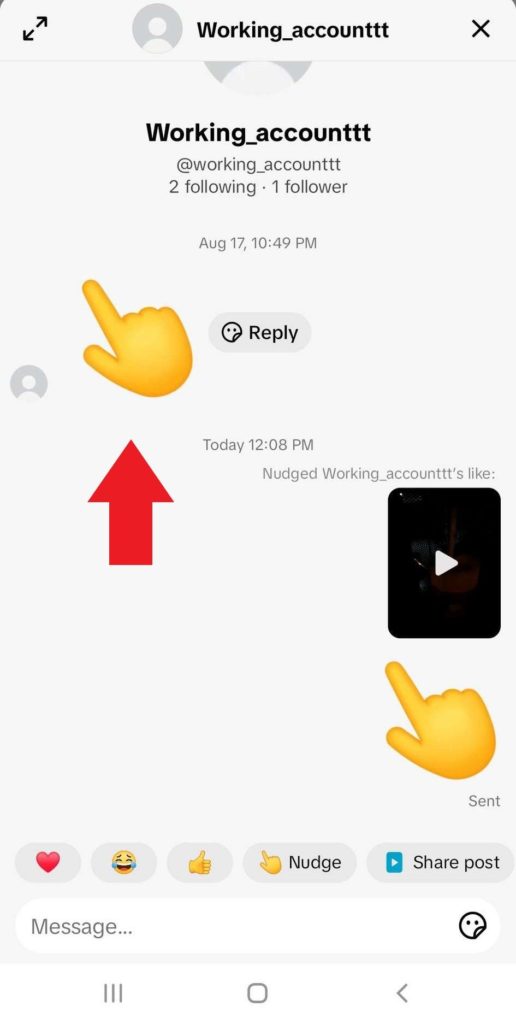
¿Qué significa un codazo en TikTok?
Funciona así:
- Puedes dar un codazo a un creador de contenidos: Envías una solicitud de empujón a un creador de contenidos al que sigues para iniciar una sesión en directo.
- Puedes darle un codazo a tu amigo: De este modo, puedes pedirles que inicien una conversación contigo.
Nota: recibirás una notificación si alguien te da un codazo en TikTok.
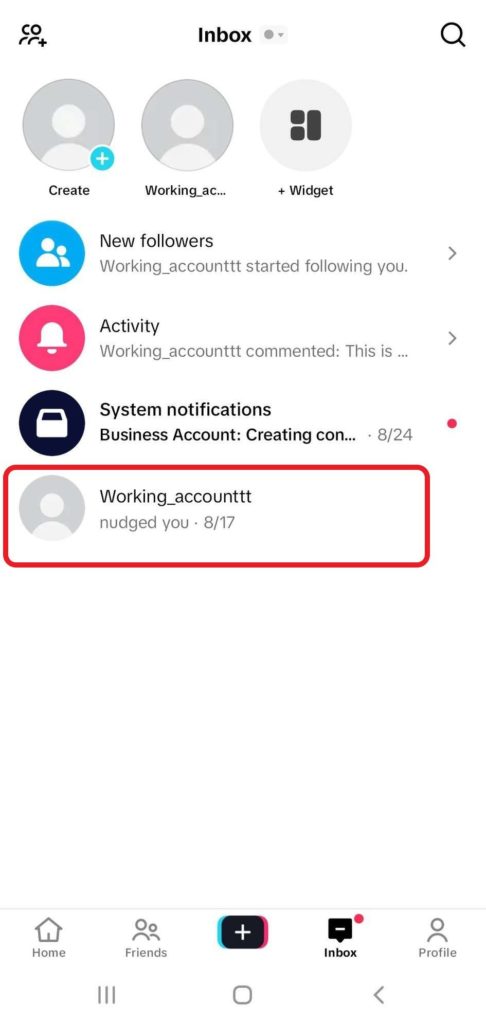
Notificación de codazo en TikTok
Hemos respondido a la pregunta “¿Qué significa ”nudge" en TikTok? Ahora, vamos a averiguar cómo puedes dar un codazo a un creador o amigo en TikTok.
Lea también: Las mejores agencias de marketing de TikTok
¿Cómo empujar a alguien en TikTok?
Hay dos formas principales de dar un codazo a un creador de contenidos o a un amigo en TikTok. Exploremos cada una de ellas:
¿Cómo empujar a un creador de contenidos en TikTok?
Para dar un codazo a un creador en TikTok, tienes que seguir estos pasos:
- Abre la aplicación y ve al perfil del creador al que quieres dar un codazo.
- Toca el icono de la campana en la parte superior.
- Síguelos si no los sigues.
- Abrir ‘Ajustes de notificación’.
- Ahora, pulse ‘Dé un codazo a’para enviar una notificación al creador.
¿Cómo empujar a un amigo en TikTok?
Si quieres dar un codazo a un amigo o seguidor e iniciar una conversación con él, tienes que hacer lo siguiente:
- Ve al perfil de la persona a la que quieres dar un codazo y pulsa ‘Enviar un 👋’.
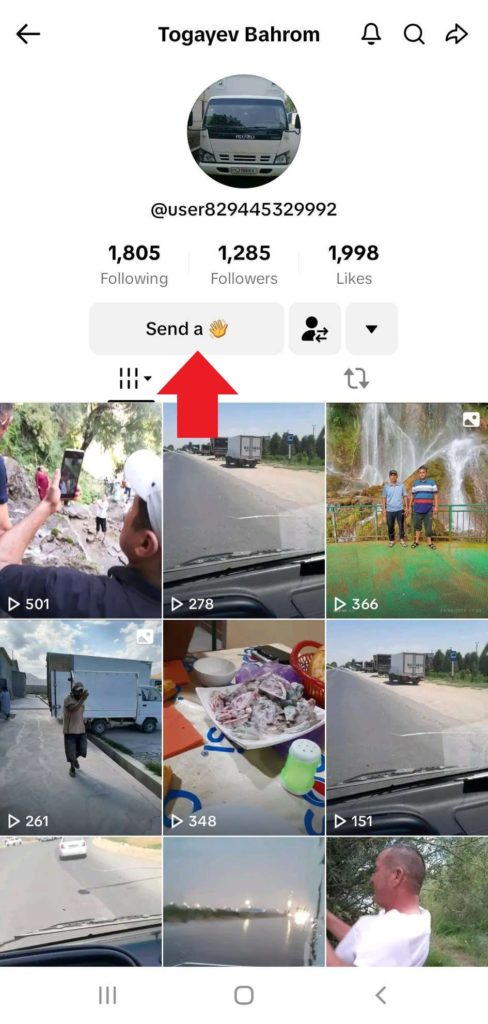 Cómo empujar a alguien en TikTok
2. Ahora que ya has saludado, simplemente pulsa ‘Dé un codazo a’.
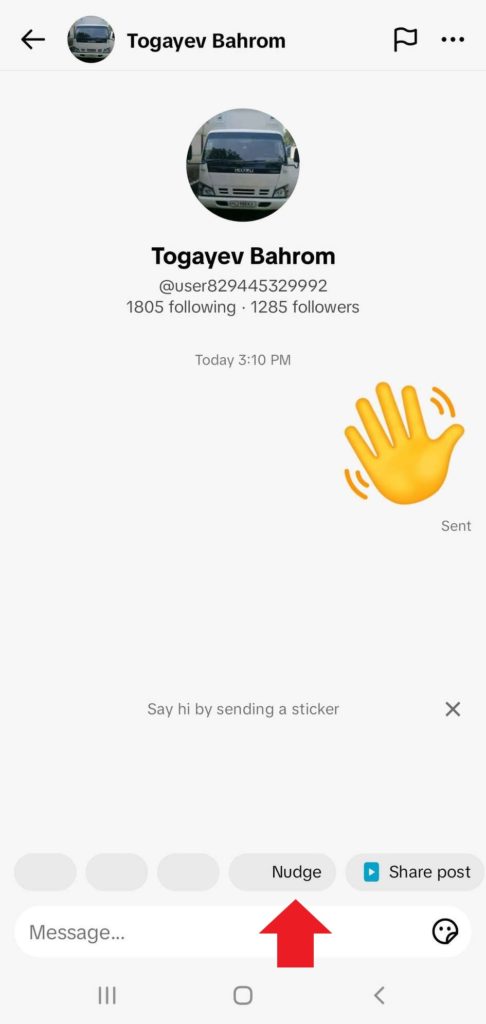
Enviar un codazo en TikTok
Ventajas y desventajas del Nudging en TikTok
Antes de intentar dar un codazo a alguien en TikTok, conviene tener en cuenta sus pros y sus contras:
Ventajas del Nudging en TikTok
Estas son algunas de las ventajas que ofrece el nudging en TikTok:
- Fomente la interacción: En primer lugar, puede crear una comunidad más interactiva y atractiva en TikTok.
- Compromiso sutil: Los codazos también son una buena forma de atraer la atención de alguien de forma más indirecta y sin ser demasiado insistente.
- Agilice la comunicación: Puedes iniciar una conversación sin tener que escribir un mensaje de texto. Esto es útil para interacciones rápidas o cuando quieres evitar mensajes largos.
Desventajas de Nudging en TikTok
Por otro lado, el nudging puede ofrecer estos inconvenientes:
- Cuestiones de privacidad: Algunos usuarios pueden sentirse incómodos cuando se les da un codazo en TikTok, especialmente si no han iniciado la conversación.
- Potencial para el spam: Si no se utiliza de forma responsable, puede provocar comportamientos spam en TikTok.
- Eficiencia limitada: Es una función sencilla y puede no ser lo bastante eficaz para animar a los creadores o a otros usuarios a entablar una conversación.
Qué significa Nudge en TikTok: FAQs
Aquí tienes algunas preguntas frecuentes sobre nudge en TikTok:
1. Qué significa Nudge en TikTok?
La función nudge de TikTok permite enviar una notificación a un creador de contenidos, solicitar un directo o enviar un sticker a un amigo para llamar su atención o recordarle algo. Es como el “Función ”Poke" en Facebook.
2. ¿Qué significa dar un codazo a alguien en TikTok?
Cuando das un codazo a alguien en TikTok, llamas su atención para iniciar una conversación en directo o sencilla o para recordarle algo.
3. ¿Qué significa cuando alguien te empuja en TikTok?
Cuando alguien te da un codazo en TikTok, simplemente intenta llamar tu atención para iniciar una conversación o recordarte algo.
4. ¿Se puede eliminar un codazo en TikTok?
Los creadores de contenido pueden desactivar la función Nudge en TikTok. Estos son los pasos a seguir:
- Ir a ‘Herramientas para creadores’ y pulse ‘Dé un codazo a’.
- Ahora, desactiva ‘Permita que los espectadores le empujen’.
5. ¿Puedo empujar a alguien en el escritorio de TikTok?
No, la función solo está disponible en la aplicación TikTok.
6. ¿Por qué no puedo encontrar un botón Nudge en TikTok?
Hay dos razones principales por las que no puedes encontrar la función nudge en TikTok:
- Esta función aún no está disponible en tu región.
- Estás utilizando una versión obsoleta de la aplicación. Así que asegúrate de actualizarla a la última versión.
Conclusión
¿Qué significa nudge en TikTok? Es una forma suave de atraer la atención de alguien o de animar a un creador a salir en directo en TikTok. Como esta función aún no está disponible para todos los usuarios, su uso no está muy extendido y puede parecer confuso. Pero si tienes acceso, úsala con responsabilidad para evitar malentendidos.
[elementor-template id="24702"]