
Have you ever experienced that sinking feeling after accidentally deleting an important Instagram direct message? Whether it was a sentimental conversation, crucial information, or simply a message you weren’t finished reading, the immediate question is often: can I get it back? The platform’s design prioritizes user privacy and ephemerality, which means recovering deleted content isn’t a straightforward, one-click process. However, all hope is not lost. This comprehensive guide will walk you through the definitive methods on how to see deleted messages on Instagram, examining both official, safe approaches and third-party alternatives, while emphasizing security and data integrity throughout.
Understanding Instagram’s Data Philosophy: Why Recovery Isn’t Simple
Before diving into recovery methods, it’s essential to understand Instagram’s stance. When you delete a message, it is removed from your view within the chat. Instagram’s architecture is designed to honor that deletion request, meaning the message is typically purged from their active servers to respect user privacy. Unlike some platforms with a “trash” or “archive” folder for messages, Instagram does not provide a native, in-app “undo” function for deleted DMs. This design choice underscores the platform’s view of direct messages as private, transient conversations. Therefore, any recovery method relies on data cached elsewhere—either on your device, in a data backup you’ve requested, or through external services you’ve previously authorized.
How to See Deleted Messages on Instagram: 5 Authoritative Methods
While no method is guaranteed, the following approaches, listed in order of safety and reliability, represent your best chances for recovering lost Instagram messages. We strongly recommend starting with Method 1, as it is the only one officially sanctioned and supported by Instagram.
1. The Official Method: Restore Messages via Instagram Data Download
This is the most reliable and secure method. Instagram allows users to download a copy of their data, which may include message history from a specific period. It’s crucial to note that this data file is not a real-time backup; it’s a snapshot created at the time of your request. If the message was deleted before Instagram compiled your data file, it will not be included.
Step-by-Step Guide to Downloading Your Instagram Data
Follow these steps meticulously to request and review your information:
- Open the Instagram app and navigate to your profile page.
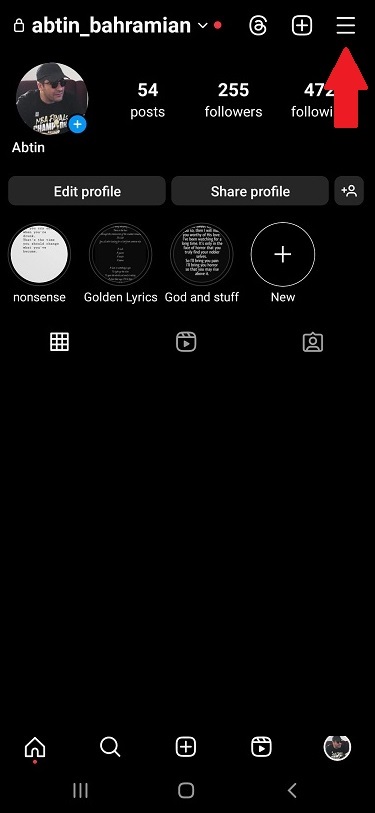
- Tap the menu icon (three horizontal lines) in the top-right corner.
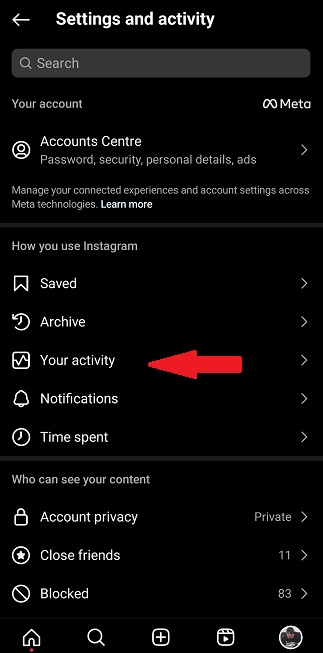
- Seleccione “Your activity” from the menu options.
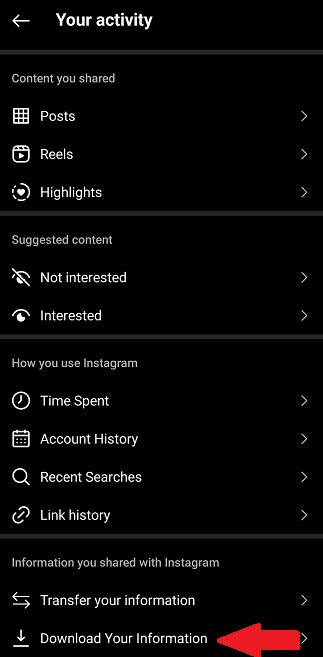
- Scroll down and tap on “Download your information.”
- On the next screen, you can choose to “Request a download” or set up “Auto-downloads.” For a one-time request, select the former.
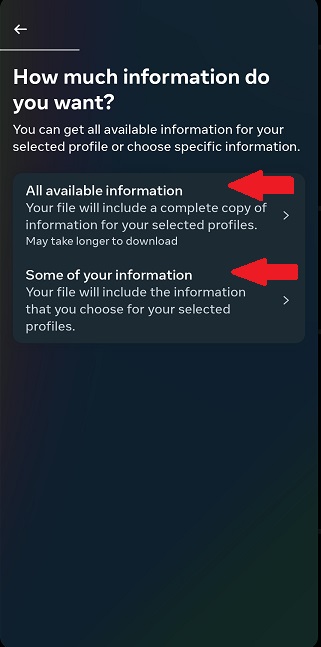
- You will be presented with options. Select “Some of your information” for a more targeted download.
- A list of data categories will appear. Ensure “Messages” is selected. You can also choose others like “Posts,” “Comments,” etc., but selecting only messages will speed up processing.
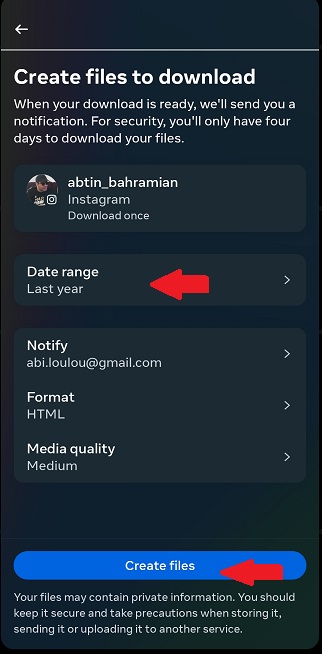
- Choose your preferred Date Range. To maximize recovery chances, select “All time” or the broadest range possible that would encompass when the message was sent.
- Seleccione Format (HTML is typically easier for viewing) and Media Quality.
- Finally, enter your email address and tap “Create files.” Instagram will notify you via email when your download is ready, which can take up to 48 hours.
How to Access and Search Your Downloaded Data
Once you receive the email with the download link:
- Download the ZIP file to your computer and extract it.
- Open the main folder and navigate to the “messages” folder.
- Here, you’ll find folders for your individual chats or group chats, often named by participant.
- Open the relevant HTML file in a web browser. You can now scroll or use your browser’s find function (Ctrl+F or Cmd+F) to search for keywords, sender names, or approximate dates.
This method’s effectiveness is contingent on Instagram’s data retention practices at the time of the download. It is the only method that does not violate Instagram’s Terms of Service.
2. Proactive Prevention: Leverage Email Notifications
This isn’t a recovery method per se, but a powerful proactive strategy to prevent future message loss. If you have email notifications enabled for new Instagram messages, every DM will generate an email. Even if the message is later deleted within Instagram, a record of its initial content (often the first few lines) remains in your email inbox.
- To enable: Go to Instagram Settings > Notifications > Email. Ensure notifications for messages are turned on.
- Action: Use your email client’s search function (e.g., search “Instagram” + the sender’s name) to find these notifications. This is excellent for recovering text snippets or confirming a message was sent.
3. Check Connected Third-Party Tools (Like DMpro)
Certain professional social media management or marketing tools offer features that can inadvertently act as a message backup. For instance, tools like DMpro provide a “DM to Email” feature that forwards all Instagram direct messages to a designated email address in real-time.
- Cómo funciona: Once configured, every message you receive is instantly sent to your email, creating a permanent, searchable archive outside of Instagram’s ecosystem.
- Key Benefit: This method captures the message at the moment of receipt, preserving it regardless of later deletion within the Instagram app by either party.
- Consideration: This requires prior setup. It is a brilliant solution for businesses, creators, or anyone who values archiving their Instagram communications but is useless for recovering messages deleted before the tool was connected.
4. Examine Device-Specific Backups (iOS & Android)
This is a less reliable but potential avenue. If your smartphone is configured to perform full device backups (iCloud for iPhone, Google One for Android), there’s a possibility that app data, including cached Instagram messages, is included.
- The Process is Complex: Recovering data this way typically involves restoring your entire device from an older backup, which would roll back all data on your phone to the backup date. This is a drastic measure and not recommended solely for a single message recovery due to the risk of losing other recent data.
- Limitaciones: App data inclusion in backups is not always guaranteed, and Instagram may encrypt its chat data within the backup, making it inaccessible.
5. The High-Risk Option: Third-Party Recovery Apps (A Strong Caution)
A simple app store search will reveal numerous applications claiming to recover deleted Instagram messages. Extreme caution is required here.
- Security Risks: Many of these apps are phishing tools designed to steal your Instagram login credentials. They often require your username and password, which is a massive red flag.
- Terms of Service Violation: Using unauthorized third-party apps to access Instagram’s backend is a direct violation of their Terms of Service. This can result in temporary suspension or permanent disabling of your account.
- Effectiveness is Dubious: Even if an app is not malicious, its technical ability to retrieve messages that Instagram has deleted from its servers is highly questionable. Most function by scraping cached data that may already be gone.
Our authoritative advice is to avoid this category of apps entirely. The risks to your account security and privacy far outweigh the slim chance of recovery they might offer.
Best Practices for Managing and Protecting Your Instagram Messages
Prevention is always better than cure. Implement these practices to safeguard your important conversations:
- Enable Email Notifications for DMs: As outlined, this creates an external, searchable record.
- Take Screenshots for Critical Information: For addresses, order numbers, contracts, or sentimental messages, a screenshot saved to a secure cloud service (like Google Photos or iCloud) is a foolproof backup.
- Use the “Save” Feature: Instagram allows you to save individual messages within a chat. Long-press on the specific message and tap “Save.” You can then access all saved messages via your Saved folder in the Instagram app menu.
- Schedule Regular Data Downloads: Make it a quarterly or bi-annual habit to download your Instagram data. This ensures you have recent snapshots of your account history, including messages.
- Educate Your Conversation Partners: Remember that in a chat, either party can delete messages for everyone. Be mindful of this dynamic.
Conclusion: A Realistic and Secure Path Forward
Recovering deleted Instagram messages is not a simple task by design. The most authoritative and secure path is through Instagram’s own Data Download tool, understanding its limitations as a historical snapshot. For future-proofing, the combination of email notifications and leveraging professional tools with archiving features like DMpro’s DM-to-Email offers a robust, proactive defense against message loss.
While the allure of quick-fix third-party apps is understandable, the associated risks to your account’s security and longevity are simply too great. By adopting the official and preventative strategies outlined in this guide, you can take control of your Instagram data, ensuring that your important conversations are preserved and accessible when you need them most.
✨ Enhanced Content ✨
Si alguna vez has borrado accidentalmente un mensaje directo de IG, puede que te preguntes cómo ver los mensajes borrados en Instagram.
Aunque no es un proceso sencillo, y puede ser frustrante que Instagram no proporcione por sí mismo una forma sólida, existen algunas posibles soluciones, como por ejemplo Recuperación de mensajes de Instagram, aplicaciones de terceros o consultar el correo electrónico.
¿Sientes curiosidad por estos métodos? ¡Sigue leyendo para saber más sobre cómo encontrar mensajes borrados en Instagram!
¿Qué son ¿Mensajes borrados en Instagram?
Los mensajes eliminados en Instagram se refieren a los mensajes que que usted o su interlocutor hayan eliminado de su historial de chat en la plataforma.
Estos mensajes pueden contener texto, fotos, vídeos u otros tipos de medios. La pregunta es: ¿hay alguna forma de ver los mensajes eliminados en Instagram? Bueno, sí y no. Instagram no proporciona una manera oficial para este asunto. Sin embargo, hay algunos métodos para alcanzar nuestro objetivo y ver los mensajes eliminados de otras maneras.
Cómo ver mensajes borrados en Instagram: 5 Métodos Fáciles
Vamos a explorar cómo comprobar los mensajes eliminados en Instagram con los siguientes métodos:
1. Cómo restaurar mensajes borrados en Instagram usando los datos del perfil
Para este método, todo lo que necesitas hacer es descargar los datos de tu perfil y buscar en ellos tus mensajes eliminados. Aquí está una guía paso a paso para ayudarte:
- Toca las tres líneas horizontales de la esquina superior derecha de la pantalla para abrir el menú.
- Selecciona ‘Su actividad’en el menú,
- Desplácese hasta “Descarga de datos” y púlsalo,
- Introduzca su dirección de correo electrónico y pulse “Solicitar descarga”,
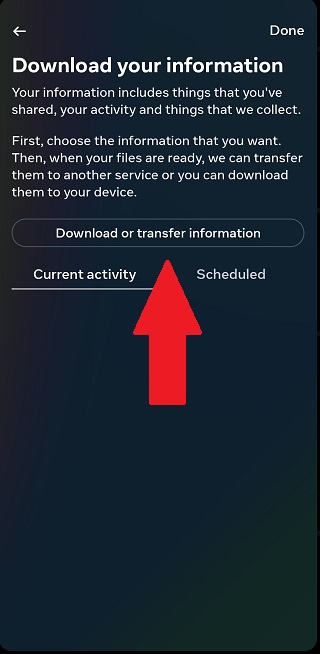
- Selecciona ‘Algunos de sus datos’y marque‘Mensajes’,,
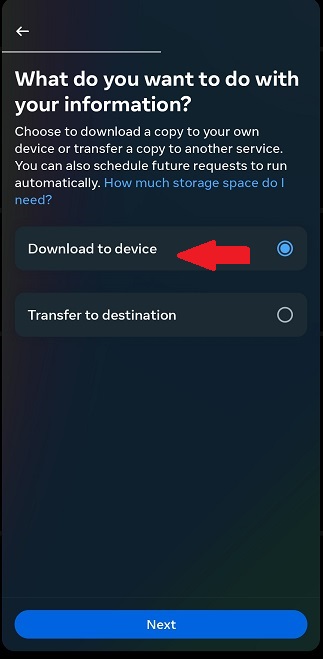
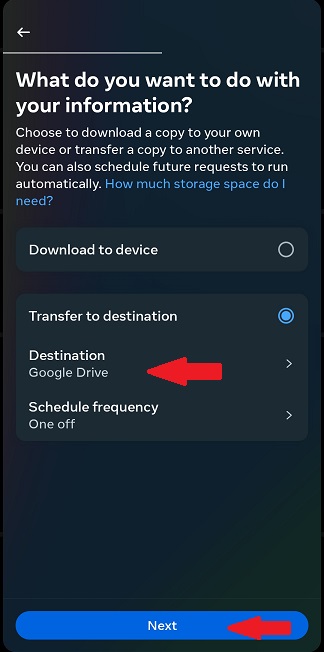
- Elige dónde quieres guardar o transferir tus datos,
- Elige tu ‘Intervalo de fechas’y pulse sobre‘Crear archivos’,
Si ha elegido un destino de transferencia, siga los pasos siguientes,
- Seleccione su destino,
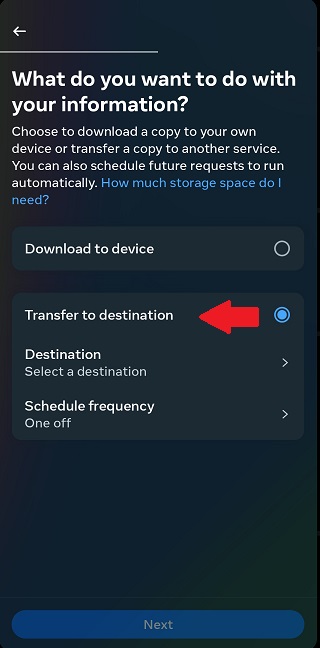
- Elija entre ‘Google Drive’o‘Dropbox’ y pulse ‘Siguiente’,
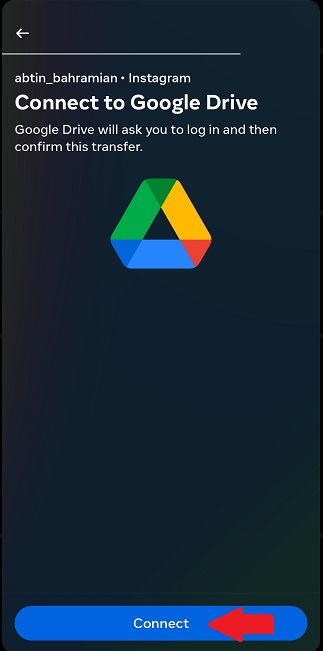
- Conéctate a tu ‘Google Drive’ o ‘Dropbox’,
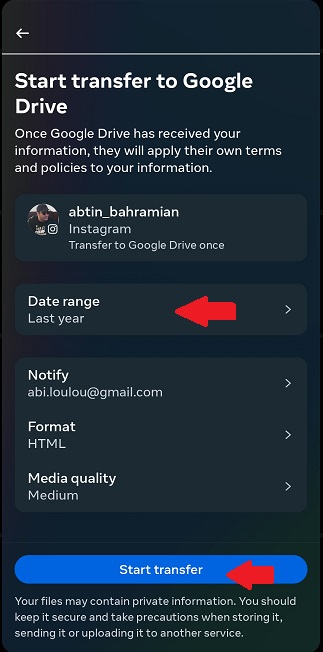
- Elija el intervalo de fechas y pulse ‘Iniciar transferencia’.
- Una vez descargados los datos, abre la aplicación “Mensajes” y busca la conversación que contenía el mensaje eliminado,
- Abre la conversación y desplázate por los mensajes para encontrar el mensaje eliminado.
2. Uso de terceros Recuperación Aplicaciones
Si te resulta difícil descargar tus datos en Instagram y recuperar los mensajes eliminados, puedes considerar el uso de aplicaciones de terceros que afirman restaurar tus mensajes. A continuación te explicamos cómo ver los mensajes borrados de Instagram con estas aplicaciones:
Nota: Ten cuidado. Algunas aplicaciones de terceros pueden ser falsas o dañinas y podrían robar tu información de acceso a Instagram. El uso de estas aplicaciones también podría romper las reglas de Instagram, lo que podría poner tu cuenta en problemas.
Más información: Cómo buscar mensajes de Instagram: La guía definitiva
Cómo ver mensajes borrados en Instagram con apps de terceros
Vamos a repasar algunas de las apps que puedes utilizar para recuperar tus mensajes borrados en Instagram:
1. DMpro
DMpro es una herramienta automatizada para Instagram DM que conectará su correo electrónico con sus mensajes de Instagram. Por lo tanto, esto puede ser una herramienta muy útil para recuperar mensajes de Instagram. Con solo activar la función “DM to Email” de DMpro, todos tus mensajes se guardarán realmente en tu correo electrónico.

DMpro también ofrece:
- Mensajes personalizados enviados manualmente
- Orientación inteligente
- Gestor de cuentas personales
- Entrega de DM garantizada
2. Dr.fone
Dr.Fone es un conjunto de herramientas para gestionar dispositivos móviles, con especial atención a la recuperación de datos y la reparación del sistema.
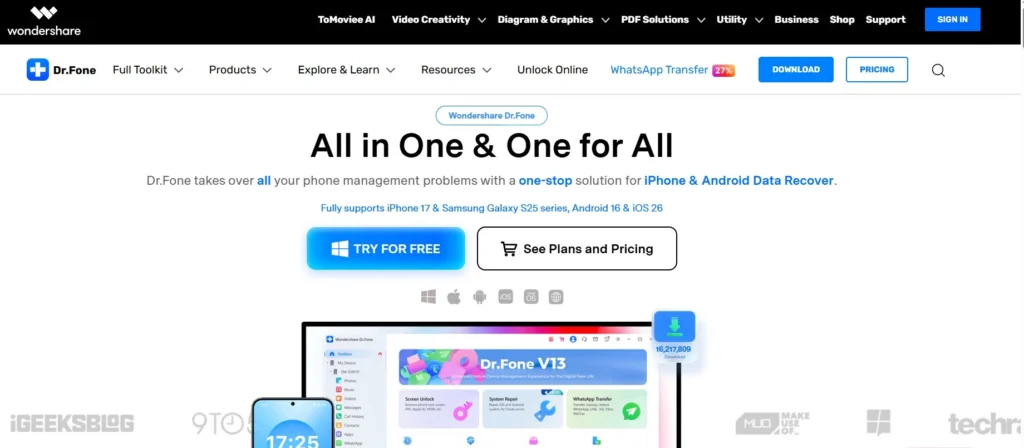
Suele promocionarse como una “ventanilla única” para solucionar una gran variedad de problemas típicos de los smartphones. En nuestro caso, recuperar mensajes borrados en Instagram es uno de los problemas que Dr.fone puede resolver. Estas son algunas de las características que puedes esperar de esta aplicación:
- Solucionar problemas como un teléfono atascado en modo de recuperación, bucles de arranque y pantallas negras.
- Recuperación de fotos, vídeos, contactos y mensajes borrados o perdidos
- Eliminar bloqueos de pantalla
- Copia de seguridad de datos
3. Fonelab
Usted puede recuperar fácilmente los datos de sus dispositivos con FoneLab sin necesidad de hacer ningún paso difícil. Esta aplicación de recuperación de mensajes Instagram puede ayudarle a recuperar todos sus mensajes borrados en Instagram y otros problemas en ningún momento.
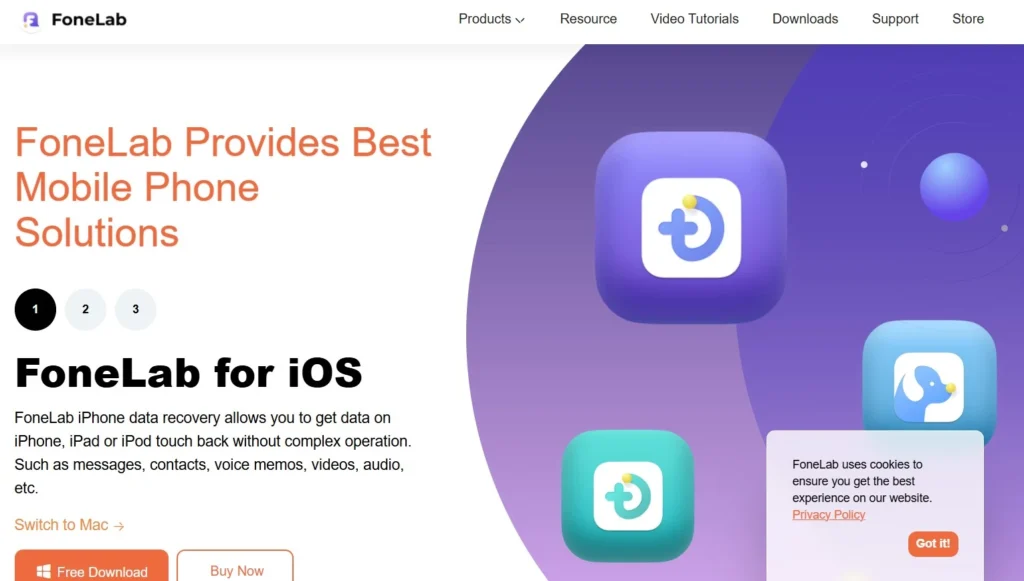
Estas son algunas de las características de esta aplicación:
- Compatibilidad multiplataforma
- Varios métodos para recuperar datos
- Vista previa antes de la recuperación
Posibles problemas al ver mensajes borrados de Instagram
Al intentar ver los mensajes eliminados en Instagram en cualquier dispositivo, estos son algunos de los posibles problemas que te puedes encontrar:
- No siempre es posible recuperar los mensajes borrados. Cuanto más tiempo lleven borrados los mensajes, menos probabilidades habrá de recuperarlos.
- Es posible que la aplicación que utilizas para recuperar mensajes eliminados no sea compatible con tu dispositivo o que no tenga los permisos necesarios para escanearlo.
- Algunos aplicaciones de recuperación de datos requieren que hagas root a tu dispositivo Android, lo que puede ser un proceso complejo que podría dañar tu dispositivo si no se hace correctamente.
- Recuperar mensajes borrados puede vulnerar Condiciones de uso de Instagram, lo que podría dar lugar a la suspensión o prohibición de su cuenta.
- Si los mensajes fueron borrados por el remitente o si la cuenta fue eliminada, puede que no sea posible recuperarlos.
- Recuperar mensajes borrados también puede requerir una suscripción de pago para algunas aplicaciones de recuperación de datos.
3. Compruebe su correo electrónico
Si tienes activadas las notificaciones por correo electrónico para Instagram, es posible que veas mensajes eliminados en la bandeja de entrada de tu correo electrónico.
Aunque Instagram elimine un mensaje directo, puedes seguir viendo el contenido del mensaje en la bandeja de entrada de tu correo electrónico si recibes una notificación por correo electrónico.
4. Pregunte a la otra persona por sus mensajes
Una forma que se me ocurre es pedir a la persona con la que chateabas que te ayude con tus mensajes borrados.
Solicita capturas de pantalla o copias de la conversación eliminada que te hayan copiado, pegado o reenviado por DM. No es lo ideal, pero puede ayudar en algunos casos.
5. Compruebe su cuenta de Facebook
Meta es la empresa matriz de Facebook e Instagram y permite a los usuarios enviar mensajes a través de ambas plataformas. Si tu cuenta de Instagram está conectada a Facebook, puedes ver los mensajes borrados de Instagram usando Facebook Messenger.
Esta estrategia funciona bien porque ambas plataformas intercambian datos cuando están integradas. Puedes recuperar conversaciones borradas de Instagram accediendo a tus chats sincronizados de Facebook Messenger.
Más información: Unsend Mensaje Instagram; ¿Cómo eliminar o recuperar?
Buenas prácticas para tratar los mensajes borrados en Instagram
Estas son algunas de las mejores prácticas para lidiar con los mensajes eliminados en Instagram y evitar la pérdida de datos:
- Haz una captura de pantalla: Si recibes un mensaje que crees que puede ser importante, haz una captura de pantalla inmediatamente. Así, si el mensaje se borra más tarde, seguirás teniendo constancia de él.
- Que no cunda el pánico: Si se borra un mensaje, intenta no preocuparte demasiado. Es posible que la persona que lo envió simplemente haya cambiado de opinión y haya decidido borrarlo. Si era un mensaje importante, ponte en contacto con la persona y pídele que vuelva a enviarlo.
- Comprueba tus solicitudes de mensajes: A veces, los mensajes eliminados acaban en la carpeta de solicitudes de mensajes. Si no ves el mensaje en tu bandeja de entrada principal, ver tus solicitudes de Instagram DM para saber si está ahí.
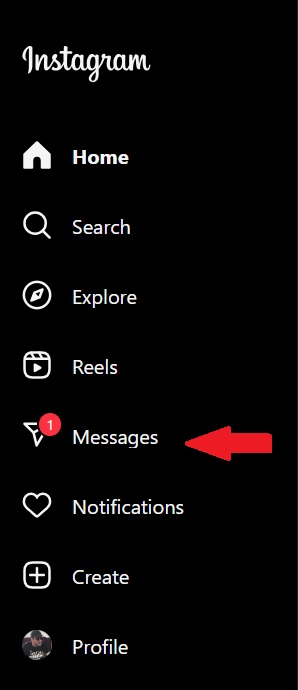
- Archiva tus mensajes: Si no quieres perder ningún mensaje importante, considera la posibilidad de archivarlos. Puedes acceder a los mensajes archivados en cualquier momento, aunque se hayan eliminado de tu bandeja de entrada principal. Todo lo que tienes que hacer es seguir los siguientes pasos:
- Ve a tus ‘mensajes directos’,
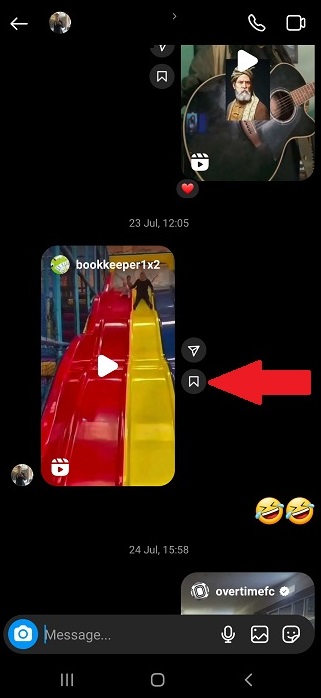
- Ve al chat con tu amigo o seguidor,
- Pulse sobre el botón‘botón de archivo’junto a la entrada que desea guardar,
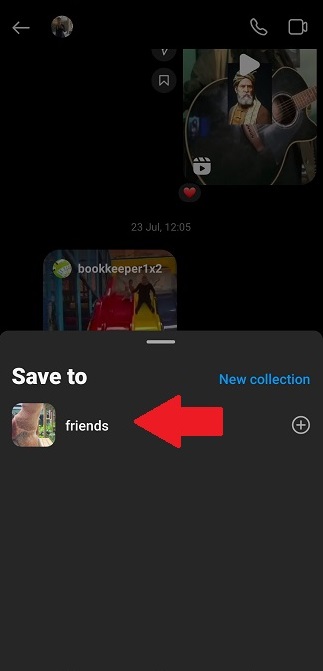
- Elige una colección en la que guardar o crea una nueva.
Conclusión
Para concluir, si te preguntas cómo ver mensajes eliminados en Instagram, solicitar una descarga de datos suele ser el método más fiable. Esto te permite especificar un intervalo de tiempo concreto para buscar los mensajes.
Sin embargo, si le resulta difícil, hay otras maneras de llegar a sus mensajes eliminados. Sólo tenga en cuenta para actuar con rapidez, ya que es importante en la recuperación de sus datos perdidos.
Preguntas frecuentes
Sí, puedes eliminar tu cuenta de Instagram, pero los mensajes directos que hayas enviado seguirán estando disponibles para otros usuarios. Tu nombre no aparecerá como remitente del mensaje; en su lugar, aparecerá ‘Instagrammer’, y tu imagen de perfil también se eliminará del intercambio.
Puedes descargar tus datos o utilizar aplicaciones de terceros para encontrar tus mensajes eliminados, o simplemente consultar tus correos electrónicos si sigues recibiendo notificaciones en tu correo electrónico.
En pocas palabras, un mensaje de Instagram nunca se borra del todo. Desaparece de tu bandeja de entrada, pero permanece en los servidores de Instagram y se marca como eliminado. Se pueden utilizar algunos métodos, como solicitar una descarga de datos, para recuperar esta información eliminada.
Sí, hay una forma de ver un mensaje si el remitente lo ha eliminado. Puedes consultar todos los mensajes que recibiste en el historial de notificaciones de Instagram, aunque el remitente los haya eliminado. Recuerda que sólo puedes ver y recuperar mensajes de Instagram que has recibido y no enviado, y esto sólo funciona si tienes activadas las notificaciones de Instagram en el momento en que recibiste los mensajes
Como mencionamos en el artículo, hay algunas aplicaciones y herramientas de terceros que afirman ser capaces de recuperar mensajes borrados de Instagram. Pueden recuperar algunos o todos tus mensajes eliminados. Sin embargo, ten en cuenta que algunas de estas aplicaciones pueden ser estafas y no son capaces de recuperar tus datos.
Para evitar borrar accidentalmente mensajes importantes de Instagram, intenta tener cuidado al navegar por la aplicación y comprueba dos veces antes de borrar nada. También puedes utilizar la función “archivar” para guardar mensajes en lugar de eliminarlos.