Unlock the Power of Sound: A Comprehensive Guide to Adding Music on Instagram
In the vibrant, fast-paced world of social media, audio has become the secret weapon for captivating audiences. Instagram, a platform once dominated by static imagery, has evolved into a multimedia hub where sound shapes discovery, emotion, and engagement. Knowing how to seamlessly add music to your Instagram posts, Stories, and Reels is no longer just a creative option—it’s a fundamental strategy for anyone looking to amplify their presence. This guide provides a professional, step-by-step walkthrough to master Instagram’s audio features, ensuring your content not only looks great but sounds incredible, resonating with viewers and the algorithm alike.
The Strategic Importance of Music on Instagram
Before diving into the mechanics, it’s crucial to understand why integrating music is a non-negotiable element of modern Instagram strategy. Audio transforms passive viewing into an immersive experience, directly influencing performance metrics and audience connection.
1. Algorithmic Amplification and Increased Reach
Instagram’s algorithm is designed to promote content that utilizes its native features. Adding music, particularly from its licensed library, signals to the algorithm that you are creating value within the platform’s ecosystem. This can lead to:
- Enhanced Distribution: Posts with music have a higher chance of appearing on the Explore page and the dedicated audio page for that song, exposing your content to vast new audiences beyond your immediate followers.
- Trend Integration: Leveraging trending sounds when they first gain momentum can catapult your content into viral cycles, as Instagram actively surfaces content using popular audio to users interested in that trend.
2. Driving Meaningful Engagement and Retention
Music is a powerful psychological trigger. A well-chosen track can:
- Increase Dwell Time: Viewers are more likely to watch your video or view your carousel post in its entirety when accompanied by compelling audio, directly boosting completion rates—a key ranking factor.
- Encourage Interaction: Emotionally resonant music makes content more relatable and shareable, leading to higher rates of likes, comments, saves, and shares.
3. Elevating Brand Storytelling and Emotional Resonance
Beyond metrics, music adds a critical layer of narrative depth. It allows you to:
- Set the Tone: A calm, acoustic track can evoke warmth and authenticity for a behind-the-scenes post, while an upbeat, energetic pop song can amplify the excitement of a product launch.
- Forge Deeper Connections: Sound can trigger nostalgia, joy, or inspiration, creating a memorable emotional anchor between your brand and your audience.
Step-by-Step: How to Add Music to an Instagram Feed Post
Contrary to popular belief, you can add music to standard photo posts and carousels, not just videos. This feature turns a simple image gallery into a dynamic, audio-enhanced experience.
- Open the Instagram app and tap the Create (+) button, then select Post.
- Select the image or multiple images for your carousel from your device’s gallery.
- After applying any desired edits or filters, proceed to the final screen before sharing. Look for the Music icon or “Add Music” label (placement may vary slightly by app version).
- Tapping this will open Instagram’s extensive audio library. You can browse curated playlists, search for specific songs or artists, or explore the Trending tab to find popular sounds.
- Select your desired song. You can then trim the audio clip to choose the perfect 5-90 second segment that plays while viewers look at your photo.
- Tap Done in the top right corner, then Share to publish your music-enhanced post.
Pro Tip: For carousel posts, the music plays throughout the viewing experience, making it ideal for telling a sequential story or showcasing multiple product features with a consistent mood.
Mastering Audio in Instagram Reels
Music is the backbone of Instagram Reels. The platform offers sophisticated audio tools specifically designed for this short-form video format, providing greater creative control.
Accessing and Using the Music Library in Reels
- Start creating a new Reel. On the recording/edit screen, locate the toolbar on the left side.
- Tap the Music option (the music note icon).
- Browse categories, use the search function, or check the “Trending” section to find your audio.
- Once selected, you can drag a slider to choose the exact segment of the song for your Reel. A waveform visualization helps you sync clips to beat drops or lyrical highlights.
Advanced Audio Features for Reels
- Lyrics Sticker: For songs with available lyrics, you can add an animated lyrics sticker. Customize its style (typeface, color) and use a slider to select which specific lines appear on screen, perfect for sing-alongs or emphasizing key phrases.
- Commercial Music: If you have a Business or Creator account, Instagram will filter and suggest songs cleared for commercial use, helping you avoid copyright issues. Always check for an “Eligible” or “Commercial Use” tag.
- Original Audio: You can also use your own original audio (voiceover, ambient sound). This audio can then be discovered and used by others, potentially starting your own trend.
For maximum impact, explore advanced Instagram Reel hacks that combine music with strategic editing, transitions, and on-screen text.
How to Add Music to Instagram Stories
Adding music to Stories is incredibly versatile, serving both aesthetic and functional purposes—from setting a mood to highlighting a moment.
Method 1: Adding Music to a Photo or Video Story
- Swipe right from your feed or tap your profile picture to create a new Story. Capture or upload your content.
- On the editing screen, tap the sticker icon (the square smiley face) in the top navigation.
- Select the “Music” sticker from the sticker tray.
- Browse the library (including “For You,” “Browse,” and “Saved” sections). After choosing a song, select the exact clip and choose a style for the display sticker (e.g., album art, a lyrics snippet, or a simple progress bar).
- Place and resize the sticker on your Story. You can also use the slider to adjust which lyrics are shown if you choose that format.
Method 2: The Music-Only Story
This feature lets you share a song directly, making the album art the visual focus of your Story—ideal for song recommendations or sharing your current vibe.
- Create a new Story but swipe up or select the Music icon from the sticker tray before adding any visual.
- Search for and select your song. You’ll see a screen where you can preview the track and choose a display format.
- Customize the appearance, then share. Your Story will display as an animated card featuring the song’s cover art, title, and artist.
Best Practices and Strategic Considerations
To use music effectively, a strategic approach is essential. Follow these guidelines to ensure your audio enhances rather than distracts.
1. Align Audio with Content and Brand Identity
The music should feel like a natural extension of your post. A fitness influencer might use high-tempo, motivational tracks, while a meditation coach would opt for tranquil, instrumental sounds. Consistency in audio mood helps solidify your brand voice.
2. Prioritize Audio Quality and Volume Balance
- Ensure the music does not overpower voiceovers or crucial natural sounds. Use the volume slider when adding music to find the perfect mix.
- If using original audio, record in a quiet environment to minimize background noise.
3. Leverage Trends Wisely
While using trending sounds is advantageous, ensure the trend aligns with your content. Forced or irrelevant trend-jacking can appear inauthentic. The best approach is to put a unique, brand-specific spin on a popular audio trend.
4. Understand Licensing and Geography
Instagram’s music library availability can vary by country due to licensing agreements. If a specific song is unavailable, use the search function to find similar sounds or instrumental versions. For business accounts, always adhere to the commercial use guidelines provided within the app.
Conclusion: Your Soundtrack for Instagram Success
Mastering the art of adding music on Instagram is a transformative skill that bridges creativity and strategy. From enriching a simple photo post to producing high-impact Reels and engaging Stories, audio is the element that can elevate your content from being merely seen to being truly felt and remembered. By following the detailed steps for each format—Feed Posts, Reels, and Stories—and adhering to strategic best practices, you equip yourself with the tools to harness algorithm favor, deepen audience engagement, and tell more compelling brand stories. Start experimenting today. Browse the trending tab, find a sound that matches your next post’s vibe, and hit share. The difference won’t just be audible; it will be measurable.
✨ Enhanced Content ✨
Social media is seeing an increase in the popularity of music, and it is important to know how to add music to Instagram posts. This is a fantastic method to give your content an additional layer of amusement and increase the level of engagement on your posts.
Adding music to Instagram posts is a smart way to keep up with top Instagram trends and boost your visibility on the platform. Using trending sounds can help your content reach more people, increase engagement, and make your posts more memorable.
In this article, we go through the step-by-step guide on adding music to Instagram posts so you can easily follow and get the job done. So, let’s start.
How to Add Music to Instagram Post?
Adding music to an Instagram feed post ( a single photo or multiple images) is such an easy process. Instagram’s app has a built-in “Add Music” feature that lets you pick a song from its library and attach a clip to your photo post.
Here’s a step-by-step guide on how to add music to IG posts!
- Tap Create at the bottom, then select Post.
- Take a new photo or pick one from your phone’s gallery.
- You will go to the next step, where you have different options. You can add music, filters, and more options here. Tap the music sign (on some versions, you may have ‘Add Music’) to open the library from where you can select music.
- Tap Done in the top right, then hit Share at the bottom.
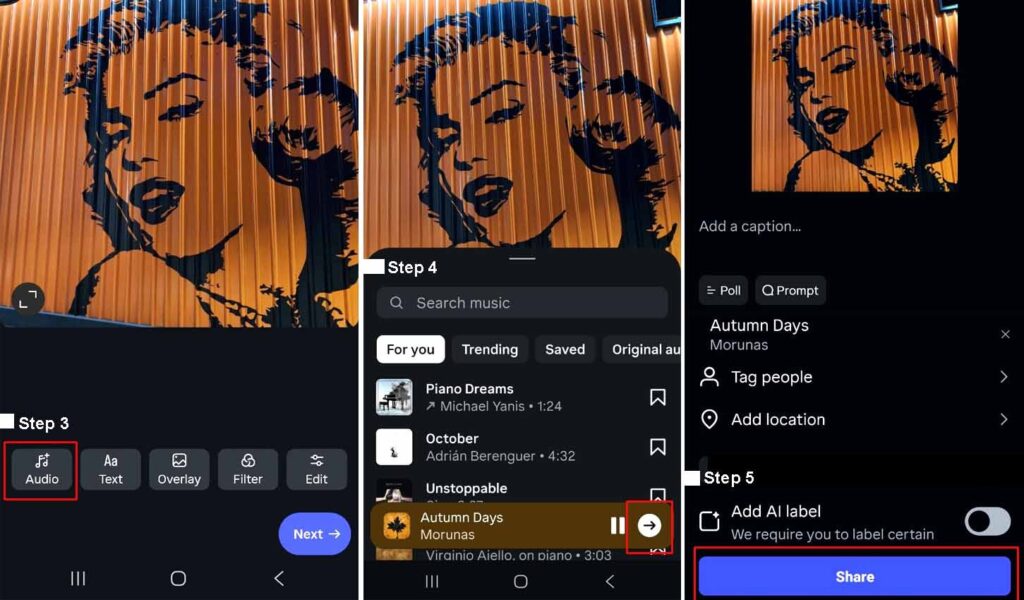
Note: If you want to follow Instagram trends, this feature has a separate tab for trending songs. So, you can discover the songs that most Instagram users add to their trending posts.
According to Instagram help center, you can follow the same steps to add music to Instagram carousels (posts with multiple images).
How to Add Music to Instagram Reels?
Adding music to Instagram Reels works just like adding it to regular posts, but Reels give you more creative freedom. You can combine short clips, videos, or multiple photos to create engaging content that stands out.
You can add any song from Instagram’s audio library to your Reels. If you have a business account, make sure to choose songs approved for commercial use. Instagram will even suggest songs that are safe to use. Moreover, you can pick the exact part of the song you want in your Reel.
When recording a Reel, you’ll see a tool menu on the left:
- Tap Music to browse or search for a song.
- Choose the part of the song you want.
- If the song has lyrics, you can style them and pick which lyrics appear using the slider.
If you don’t see the music sticker, make sure your app is updated to the latest version from the App Store or Google Play Store. For more creative ways to level up your content, check out these advanced Instagram Reel hacks.
How to Add Music to Instagram Stories?
To add a song to your story, take the following steps:
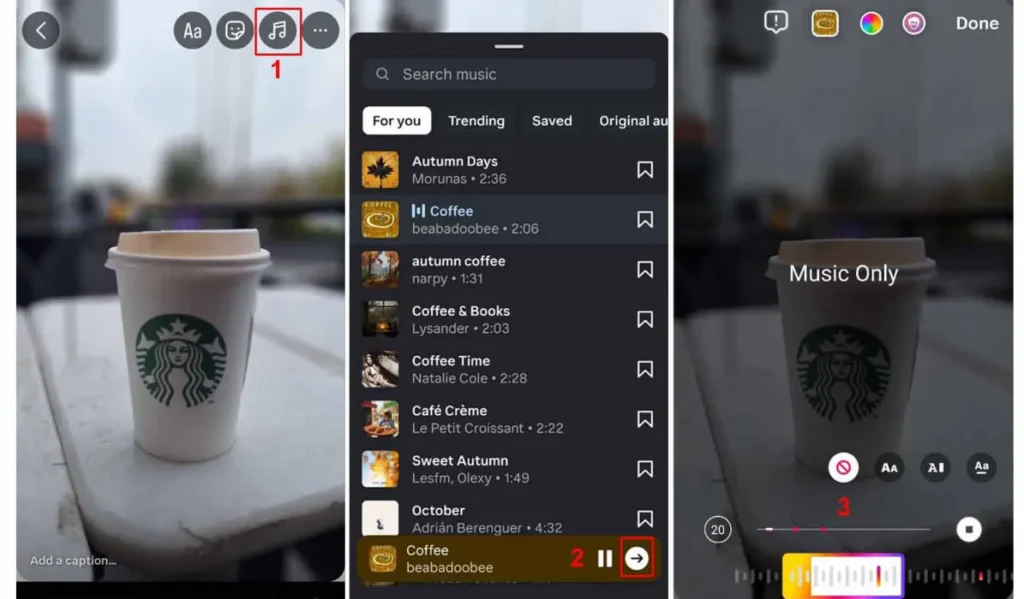
- Open Stories, select what you want to share, and tap the music icon at the top.
- Choose a song from For You, Browse, or your Saved Music.
- Pick the part of the song you want to play, then place the sticker on your Story.
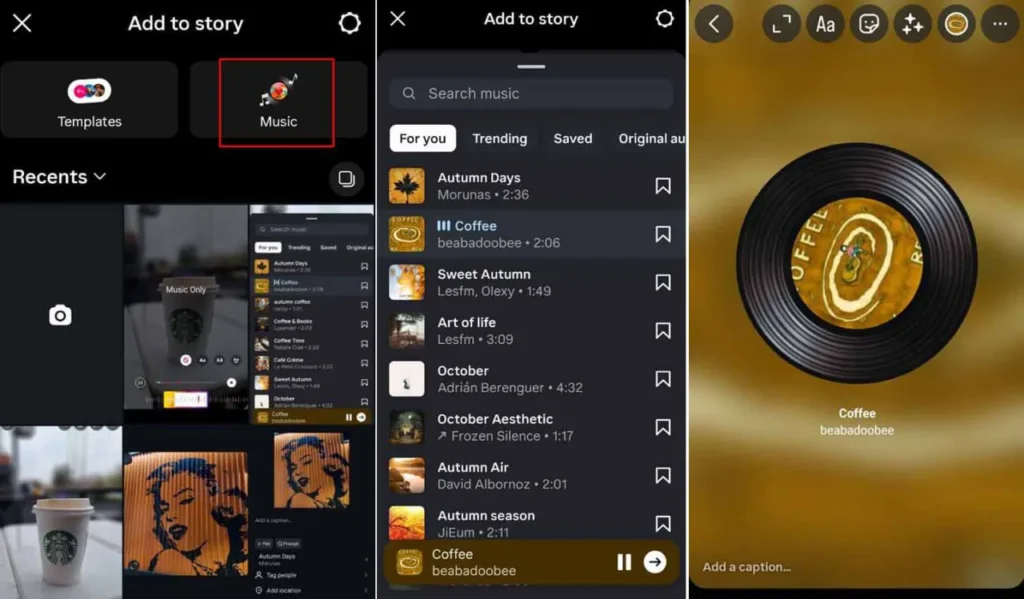
You can also add music to Instagram stories without any image. This way, your story will show the cover of the song.
Why Adding Music to Instagram Posts is Important?
Let us first see why you must learn how to add music to your Instagram because writing engaging and funny Instagram captions may not be enough to get the engagement you want.
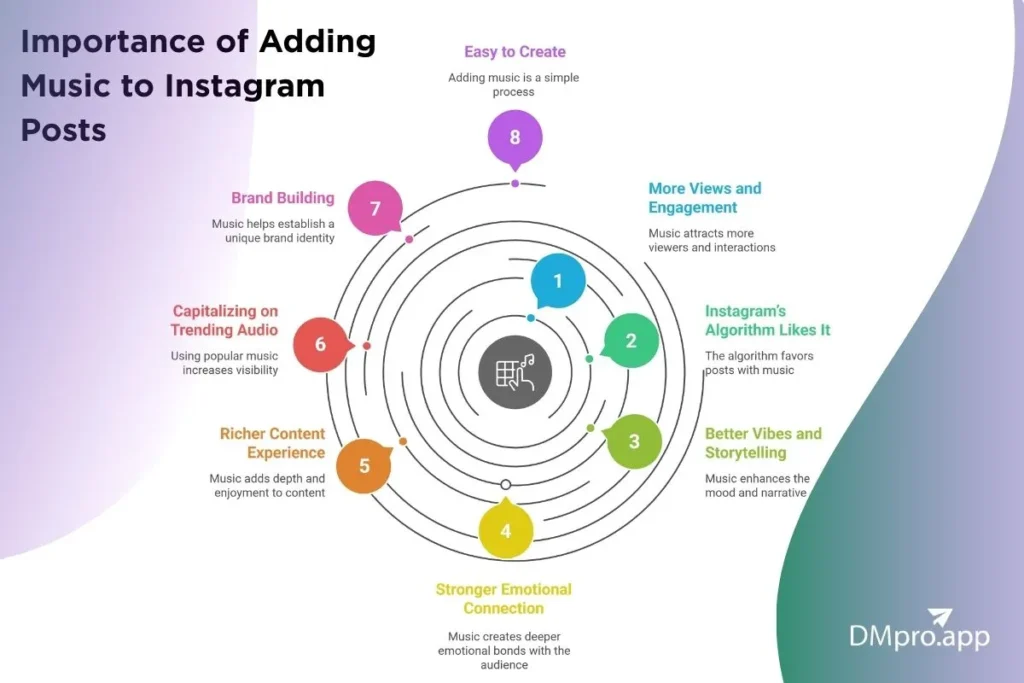
1. More Views and Engagement
Music makes your post pop. When people hear a good song, they’re more likely to stop scrolling and watch. Instagram also pushes posts with music to more people, not just your followers.
Using a trending song can give your photo or carousel extra reach since it can also show up in the Reels tab. More eyes on your post usually means more likes, comments, and shares.
2. Instagram’s Algorithm Likes It
Instagram rewards people who use its features. So, when you add music (especially trending audio), your post is more likely to show up on the Explore page or under that audio’s page. That means more people can discover your content without you paying for ads.
If you use a trending song when it’s just starting to blow up, your post has a better chance to get noticed. Riding the wave early can help your content spread faster.
Sounds amazing, right?
3. Better Vibes and Storytelling
A song can totally change how your post feels. Calm music can make a sunset photo feel peaceful. A fast beat can make a party photo feel more fun. Music adds personality to your post and makes it more than “just a picture.”
4. Stronger Emotional Connection
Music moves people on an emotional level. A familiar song can bring back memories or set a mood your audience connects with. That emotional spark can lead to more engagement and stronger connections with your followers.
5. Richer Content Experience
One photo isn’t always enough to show the feeling you want on Instagram. If you want to bring back memories while posting on Instagram, music can help set the mood and make your post more powerful. The right song can change how people feel when they see your post.
6. Brand Building
Using music in your Instagram posts is a smart way to strengthen your brand. Many businesses already use carefully chosen songs in ads to match their image and message. You can do the same by picking instrumental tracks or lyrics that reflect your brand’s style, values, or products.
7. Easy to Create
It is not a secret that videos have a huge impact on the popularity of an Instagram account, people are more likely to send videos in DMs, but making videos is not an easy task to undertake. Thankfully, you can benefit from the rewards of video content without having difficulties by knowing how to add your own music to Instagram posts.
Compared to creating video content, making a typical Instagram feed post with music is far simpler and takes less effort. To publish it, just follow the standard procedures for uploading a picture and including a music track just as it comes in the upcoming section.
Conclusion
Now that you have learned how to add music to Instagram posts and the reason behind its importance, you can easily take advantage of this amazing feature. Choose your images, select a piece of fitting music for them, and see how it can raise your engagement.
FAQs
Let’s go through some of the most common questions on the Internet about our topic at hand:
Unfortunately, you are not able to add music to your posts using the Instagram online app at the moment. You can always check Instagram news to see if the feature is available or not.
There are multiple reasons behind being unable to add music to your Instagram post. First of all, make sure that your Instagram is up to date and has all the features available. If your Instagram is up to date and you still can’t add music to your posts, Instagram may have blocked this feature in your region.
Unfortunately, you can’t. After uploading a photo to Instagram, you cannot add music to it. However, you can change the post’s location, tags, caption, and other aspects of it.
Yes. you can choose any piece of music from your library. However, be aware that using viral music can help you better if you are looking to raise your post engagement.
If you upload a carousel with both photos and videos, though, the music option won’t be available. So if music is important, it’s best to post your video as a Reel. Instagram now turns all video content into Reels, and Reels already support music!