
Have you ever experienced that sinking feeling after accidentally deleting an important Instagram direct message? Whether it was a sentimental conversation, crucial information, or simply a message you weren’t finished reading, the immediate question is often: can I get it back? The platform’s design prioritizes user privacy and ephemerality, which means recovering deleted content isn’t a straightforward, one-click process. However, all hope is not lost. This comprehensive guide will walk you through the definitive methods on how to see deleted messages on Instagram, examining both official, safe approaches and third-party alternatives, while emphasizing security and data integrity throughout.
Understanding Instagram’s Data Philosophy: Why Recovery Isn’t Simple
Before diving into recovery methods, it’s essential to understand Instagram’s stance. When you delete a message, it is removed from your view within the chat. Instagram’s architecture is designed to honor that deletion request, meaning the message is typically purged from their active servers to respect user privacy. Unlike some platforms with a “trash” or “archive” folder for messages, Instagram does not provide a native, in-app “undo” function for deleted DMs. This design choice underscores the platform’s view of direct messages as private, transient conversations. Therefore, any recovery method relies on data cached elsewhere—either on your device, in a data backup you’ve requested, or through external services you’ve previously authorized.
How to See Deleted Messages on Instagram: 5 Authoritative Methods
While no method is guaranteed, the following approaches, listed in order of safety and reliability, represent your best chances for recovering lost Instagram messages. We strongly recommend starting with Method 1, as it is the only one officially sanctioned and supported by Instagram.
1. The Official Method: Restore Messages via Instagram Data Download
This is the most reliable and secure method. Instagram allows users to download a copy of their data, which may include message history from a specific period. It’s crucial to note that this data file is not a real-time backup; it’s a snapshot created at the time of your request. If the message was deleted before Instagram compiled your data file, it will not be included.
Step-by-Step Guide to Downloading Your Instagram Data
Follow these steps meticulously to request and review your information:
- Open the Instagram app and navigate to your profile page.
- Tap the menu icon (three horizontal lines) in the top-right corner.
- Select “Your activity” from the menu options.
- Scroll down and tap on “Download your information.”
- On the next screen, you can choose to “Request a download” or set up “Auto-downloads.” For a one-time request, select the former.
- You will be presented with options. Select “Some of your information” for a more targeted download.
- A list of data categories will appear. Ensure “Messages” is selected. You can also choose others like “Posts,” “Comments,” etc., but selecting only messages will speed up processing.
- Choose your preferred Date Range. To maximize recovery chances, select “All time” or the broadest range possible that would encompass when the message was sent.
- Select the Format (HTML is typically easier for viewing) and Media Quality.
- Finally, enter your email address and tap “Create files.” Instagram will notify you via email when your download is ready, which can take up to 48 hours.
How to Access and Search Your Downloaded Data
Once you receive the email with the download link:
- Download the ZIP file to your computer and extract it.
- Open the main folder and navigate to the “messages” folder.
- Here, you’ll find folders for your individual chats or group chats, often named by participant.
- Open the relevant HTML file in a web browser. You can now scroll or use your browser’s find function (Ctrl+F or Cmd+F) to search for keywords, sender names, or approximate dates.
This method’s effectiveness is contingent on Instagram’s data retention practices at the time of the download. It is the only method that does not violate Instagram’s Terms of Service.
2. Proactive Prevention: Leverage Email Notifications
This isn’t a recovery method per se, but a powerful proactive strategy to prevent future message loss. If you have email notifications enabled for new Instagram messages, every DM will generate an email. Even if the message is later deleted within Instagram, a record of its initial content (often the first few lines) remains in your email inbox.
- To enable: Go to Instagram Settings > Notifications > Email. Ensure notifications for messages are turned on.
- Action: Use your email client’s search function (e.g., search “Instagram” + the sender’s name) to find these notifications. This is excellent for recovering text snippets or confirming a message was sent.
3. Check Connected Third-Party Tools (Like DMpro)
Certain professional social media management or marketing tools offer features that can inadvertently act as a message backup. For instance, tools like DMpro provide a “DM to Email” feature that forwards all Instagram direct messages to a designated email address in real-time.
- How it works: Once configured, every message you receive is instantly sent to your email, creating a permanent, searchable archive outside of Instagram’s ecosystem.
- Key Benefit: This method captures the message at the moment of receipt, preserving it regardless of later deletion within the Instagram app by either party.
- Consideration: This requires prior setup. It is a brilliant solution for businesses, creators, or anyone who values archiving their Instagram communications but is useless for recovering messages deleted before the tool was connected.
4. Examine Device-Specific Backups (iOS & Android)
This is a less reliable but potential avenue. If your smartphone is configured to perform full device backups (iCloud for iPhone, Google One for Android), there’s a possibility that app data, including cached Instagram messages, is included.
- The Process is Complex: Recovering data this way typically involves restoring your entire device from an older backup, which would roll back all data on your phone to the backup date. This is a drastic measure and not recommended solely for a single message recovery due to the risk of losing other recent data.
- Limitations: App data inclusion in backups is not always guaranteed, and Instagram may encrypt its chat data within the backup, making it inaccessible.
5. The High-Risk Option: Third-Party Recovery Apps (A Strong Caution)
A simple app store search will reveal numerous applications claiming to recover deleted Instagram messages. Extreme caution is required here.
- Security Risks: Many of these apps are phishing tools designed to steal your Instagram login credentials. They often require your username and password, which is a massive red flag.
- Terms of Service Violation: Using unauthorized third-party apps to access Instagram’s backend is a direct violation of their Terms of Service. This can result in temporary suspension or permanent disabling of your account.
- Effectiveness is Dubious: Even if an app is not malicious, its technical ability to retrieve messages that Instagram has deleted from its servers is highly questionable. Most function by scraping cached data that may already be gone.
Our authoritative advice is to avoid this category of apps entirely. The risks to your account security and privacy far outweigh the slim chance of recovery they might offer.
Best Practices for Managing and Protecting Your Instagram Messages
Prevention is always better than cure. Implement these practices to safeguard your important conversations:
- Enable Email Notifications for DMs: As outlined, this creates an external, searchable record.
- Take Screenshots for Critical Information: For addresses, order numbers, contracts, or sentimental messages, a screenshot saved to a secure cloud service (like Google Photos or iCloud) is a foolproof backup.
- Use the “Save” Feature: Instagram allows you to save individual messages within a chat. Long-press on the specific message and tap “Save.” You can then access all saved messages via your Saved folder in the Instagram app menu.
- Schedule Regular Data Downloads: Make it a quarterly or bi-annual habit to download your Instagram data. This ensures you have recent snapshots of your account history, including messages.
- Educate Your Conversation Partners: Remember that in a chat, either party can delete messages for everyone. Be mindful of this dynamic.
Conclusion: A Realistic and Secure Path Forward
Recovering deleted Instagram messages is not a simple task by design. The most authoritative and secure path is through Instagram’s own Data Download tool, understanding its limitations as a historical snapshot. For future-proofing, the combination of email notifications and leveraging professional tools with archiving features like DMpro’s DM-to-Email offers a robust, proactive defense against message loss.
While the allure of quick-fix third-party apps is understandable, the associated risks to your account’s security and longevity are simply too great. By adopting the official and preventative strategies outlined in this guide, you can take control of your Instagram data, ensuring that your important conversations are preserved and accessible when you need them most.
✨ Enhanced Content ✨
If you’ve ever accidentally deleted an IG direct message, you might be wondering how to see deleted messages on Instagram.
While it’s not a simple process, and can be frustrating that Instagram doesn’t provide a solid way itself, there are a few potential workarounds, such as Instagram message recovery, third-party apps, or checking your emails.
Curious about these methods? Keep reading to learn more about how to find deleted messages on Instagram!
What Are Deleted Messages On Instagram?
Deleted messages on Instagram refer to the messages that you or your conversation partner have removed from your chat history on the platform.
These messages may contain text, photos, videos, or other types of media. The question is: Is there a way to see deleted messages on Instagram? Well, yes and no. Instagram doesn’t provide an official way for this matter. However, there are some methods to reach our goal and see deleted messages in other ways.
How to See Deleted Messages on Instagram: 5 Easy Methods
Let’s explore how to check deleted messages on Instagram with the following methods:
1. Restore Deleted Messages on Instagram Using Profile Data
For this method, all you need to do is download your profile data and look through it for your deleted messages. Here’s a step-by-step guide to help you:
- Tap the three horizontal lines in the top right corner of the screen to open the menu.
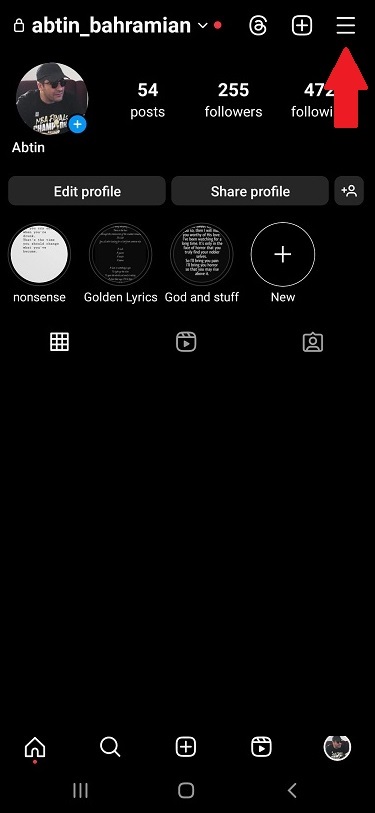
- Select ‘Your activity’ from the menu,
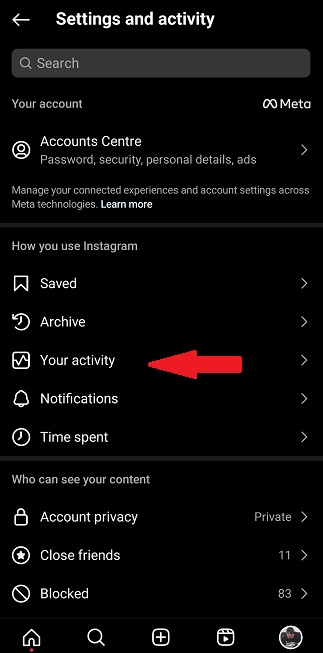
- Scroll down to “Data Download” and tap it,
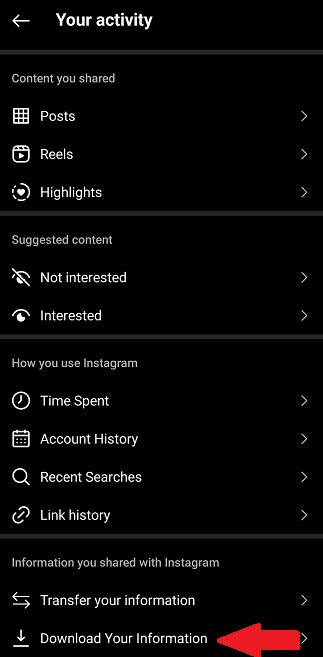
- Enter your email address and tap “Request Download”,
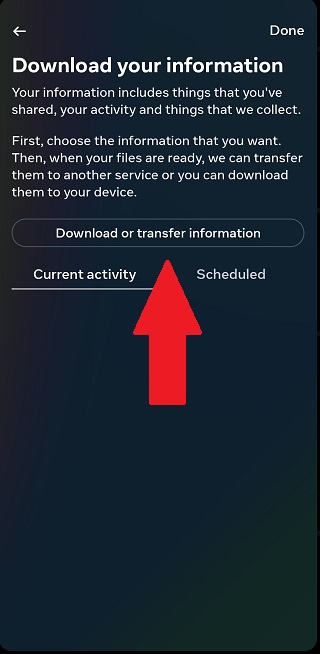
- Select ‘Some of your information’, and check ‘Messages’,,
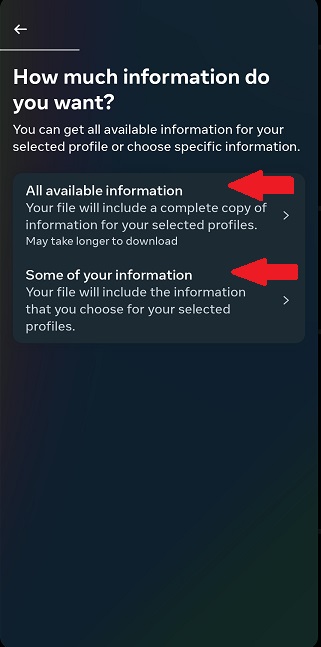
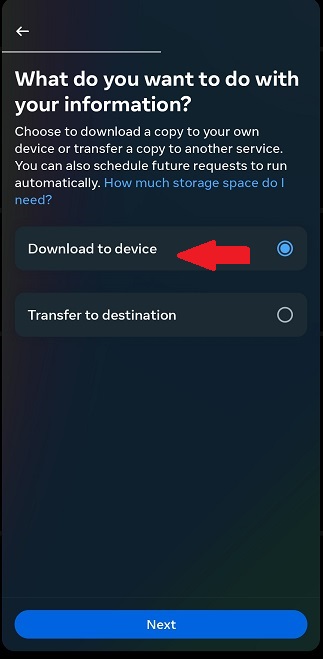
- Choose where you want to save your data or transfer to,
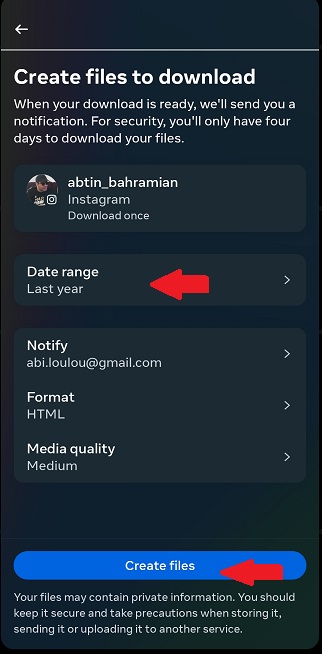
- Choose your ‘Date range’ and tap on ‘Create files’,
If you chose a transfer destination, go through the next steps,
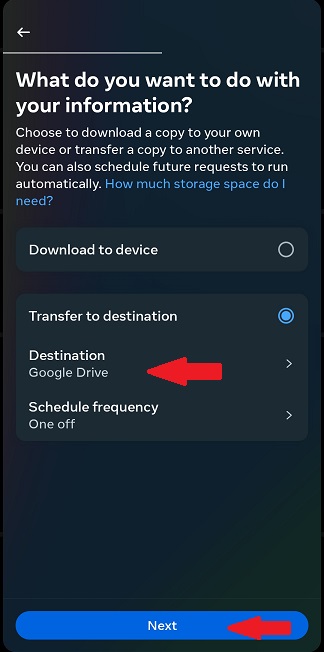
- Select your Destination,
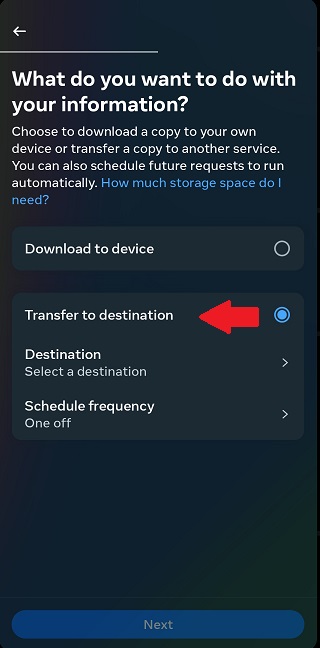
- Choose between ‘Google Drive’ or ‘Dropbox’ and tap ‘Next’,
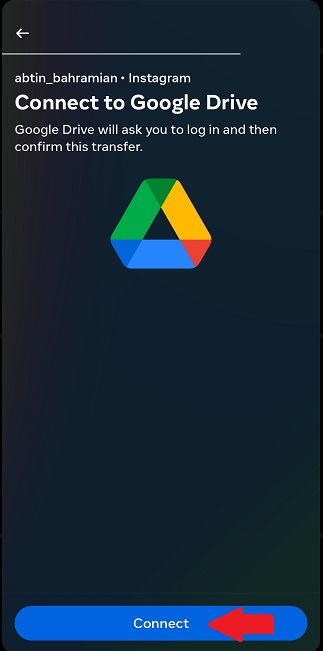
- Connect to your ‘Google Drive’ or ‘Dropbox’,
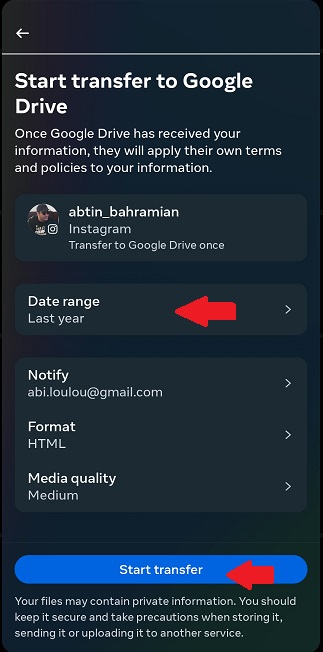
- Choose your Date range and tap on ‘Start Transfer’.
- Once you’ve downloaded your data, open the “Messages” folder and look for the conversation that contained the deleted message,
- Open the conversation and scroll through the messages to find the deleted message.
2. Using Third-party Recovery Apps
If you find it challenging to download your data on Instagram and recover deleted messages, you might consider using third-party apps that claim to restore your messages. Here’s how to see deleted Instagram messages using these apps:
Note: Be cautious! Some third-party apps might be fake or harmful and could steal your Instagram login information. Using these apps might also break Instagram’s rules, which could get your account in trouble.
Read more: How to Search Instagram Messages: The Ultimate Guide
How to See Deleted Messages on Instagram with Third-party Apps
Let’s go through some of the apps you can use for recovering your deleted messages on Instagram:
1. DMpro
DMpro is an automated tool for Instagram DM that will connect your email with your Instagram messages. Therefore, this can be a very useful tool for recovering Instagram messages. By just turning on DMpro’s “DM to Email” feature, all of your messages are truly saved in your email.

DMpro also offers:
- Manually sent customized messages
- Smart Targeting
- Personal account manager
- Guaranteed DM Delivery
2. Dr.fone
Dr.Fone is a suite of tools for managing mobile devices, with a focus on data recovery and system repair.
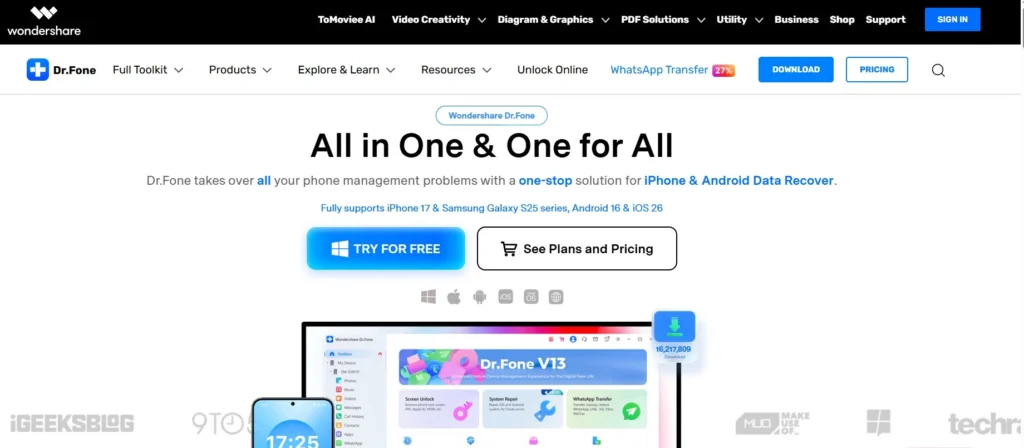
It is usually promoted as a “one-stop shop” for fixing a variety of typical smartphone problems. In our case, recovering deleted messages on Instagram is one of the problems Dr.fone can solve. Here are some of the features you can expect from this app:
- Fixing issues like a phone stuck in recovery mode, boot loops, and black screens.
- Recovering deleted or lost photos, videos, contacts, and messages
- Removing screen locks
- Backing up data
3. Fonelab
You can easily recover data from your devices with FoneLab without needing to do any difficult steps. This Instagram message recovery app can help you recover all of your deleted messages on Instagram and other problems in no time.
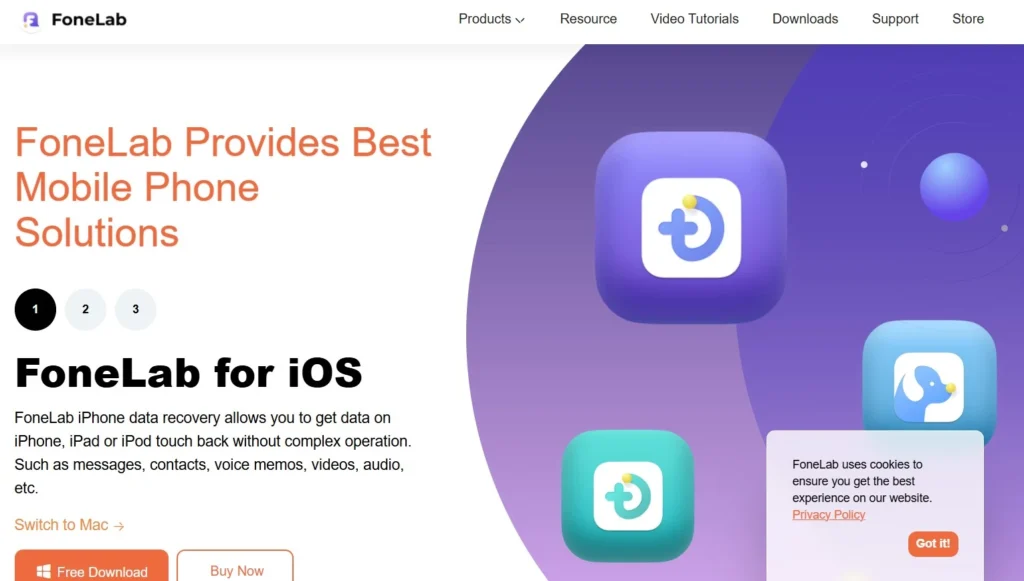
Here are some of this app’s features:
- Cross-platform compatibility
- Various methods for recovering data
- Preview before recovery
Potential Issues When Seeing Deleted Instagram Messages
While attempting to see deleted messages on Instagram on any device, here are some potential issues that you might encounter:
- Recovering deleted messages may not always be successful. The longer the messages have been deleted, the less likely it is that they can be recovered.
- The app you use to recover deleted messages may not be compatible with your device, or it may not have the necessary permissions to scan your device.
- Some data recovery apps require you to root your Android device, which can be a complex process that could harm your device if not done correctly.
- Recovering deleted messages may violate Instagram’s terms of use, which could result in your account being suspended or banned.
- If the messages were deleted by the sender or if the account was deleted, it may not be possible to recover them.
- Recovering deleted messages may also require a paid subscription for some data recovery apps.
3. Check Your Email
If you have email notifications turned on for Instagram, you may be able to see deleted messages in your email inbox.
Even if Instagram deletes a direct message, you can still view the message content in your email inbox if you receive an email notification.
4. Ask The Other Person For Your Messages
One way that comes to mind is to ask the person you were chatting with to help you with your deleted messages.
Request screenshots or copies of the deleted conversation that have been copied, pasted, or forwarded to you by DMing them. It’s not ideal, but it can help in some cases.
5. Check Your Facebook Account
Meta is the parent company for both Facebook and Instagram and allows users to do their messaging across both platforms. If your Instagram account is connected to Facebook, you can see deleted Instagram messages using Facebook Messenger.
This strategy works well because both platforms exchange data when integrated. You can retrieve deleted Instagram conversations by accessing your Facebook Messenger synchronized chats.
Read more: Unsend Message Instagram; How To Delete Or Recover?
Best Practices For Dealing With Deleted Messages On Instagram
Here are some best practices for dealing with deleted messages on Instagram and preventing data loss:
- Take a screenshot: If you receive a message that you think might be important, take a screenshot of it right away. That way, if the message is deleted later, you will still have a record of it.
- Don’t panic: If a message is deleted, try not to worry too much. It’s possible that the person who sent it simply changed their mind and decided to delete it. If it was an important message, reach out to the person and ask them to resend it.
- Check your message requests: Sometimes, deleted messages will end up in your message requests folder. If you don’t see the message in your main inbox, see your Instagram DM requests to find out if it’s there.
- Archive your messages: If you don’t want to lose any important messages, consider archiving them. Archived messages can be accessed at any time, even if they’re deleted from your main inbox. All you need to do is to follow the following steps:
- Go to your ‘direct messages’,
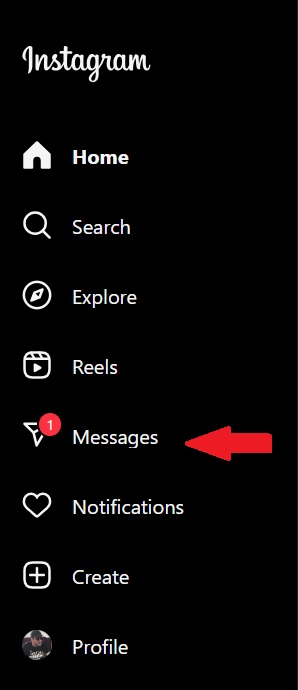
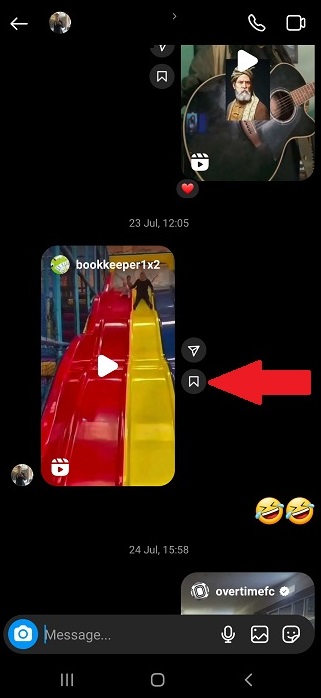
- Go to your chat with your friend or follower,
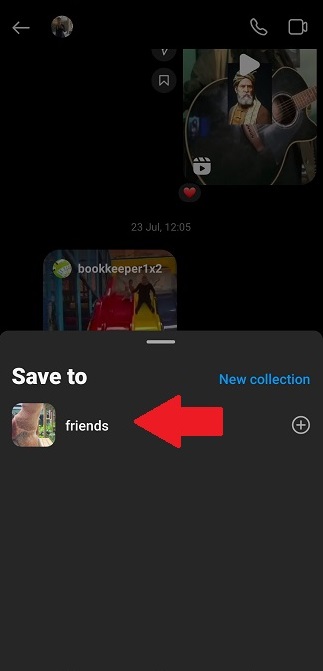
- Tap on the ‘archive button’ adjacent to the post you want to save,
- Choose a collection to save in or create a new one.
Conclusion
To conclude, if you’re wondering how to see deleted messages on Instagram, requesting a data download is generally the most reliable method. This allows you to specify a specific time range to search for the messages.
However, if you find it challenging, there are other ways to reach your deleted messages. Just keep in mind to act fast because it is important in the recovery of your lost data.
FAQs
Yes. You can delete your Instagram account, but the direct messages you’ve sent will remain available to other users. Your name won’t appear as the message sender; instead, ‘Instagrammer’ will appear, and your profile image will be deleted from the exchange as well.
You can download your data or use third-party apps to find your deleted messages, or simply check your emails if you still get notifications on your email.
To put it briefly, an Instagram message is never fully deleted. It disappears from your inbox, but it remains on Instagram’s servers and is marked as deleted. Some methods, like requesting a data download, can be used to recover this deleted information.
Yes. There is one way to see a message if the sender has deleted it. You can go through every message you got from Instagram notification history, even if the sender has since removed them. Remember that you can only view and recover Instagram messages that you have received and not sent, and this only works if you have Instagram notifications enabled at the time you got the messages
As we mentioned in the article, there are some third-party apps and tools that claim to be able to recover deleted Instagram messages. They can recover some or all of your deleted messages. However, keep in mind that some of these apps can be scams and are unable to recover your data.
To avoid accidentally deleting important Instagram messages, try to be careful when navigating the app and double-check before deleting anything. You can also consider using the “archive” feature to save messages instead of deleting them.