In the ever-evolving landscape of social media, personalization has transitioned from a luxury to a core expectation. As we look ahead to 2025, Instagram continues to refine its platform, transforming simple messaging into a rich, expressive experience. At the heart of this evolution lies a powerful yet often underutilized feature: the Instagram chat theme. This capability goes beyond mere aesthetics; it is a tool for branding, mood expression, and enhanced digital communication. This comprehensive guide will delve deep into the world of Instagram chat themes, exploring their functionality, strategic benefits, and optimal use cases to help you fully personalize your DM experience in the coming year.
The Evolution of Instagram Messenger: Beyond Text
Instagram’s Direct Messenger has undergone a remarkable transformation. It has evolved from a basic text-and-photo inbox into a dynamic communication hub rivaling dedicated messaging apps. Features like Vanish Mode for ephemeral conversations, message reactions for quick feedback, and robust search functionality have set a new standard. The introduction of chat themes in late 2020 marked a significant step in this visual-first journey, allowing users to imbue their private conversations with personality and style.
Defining the Instagram Chat Theme
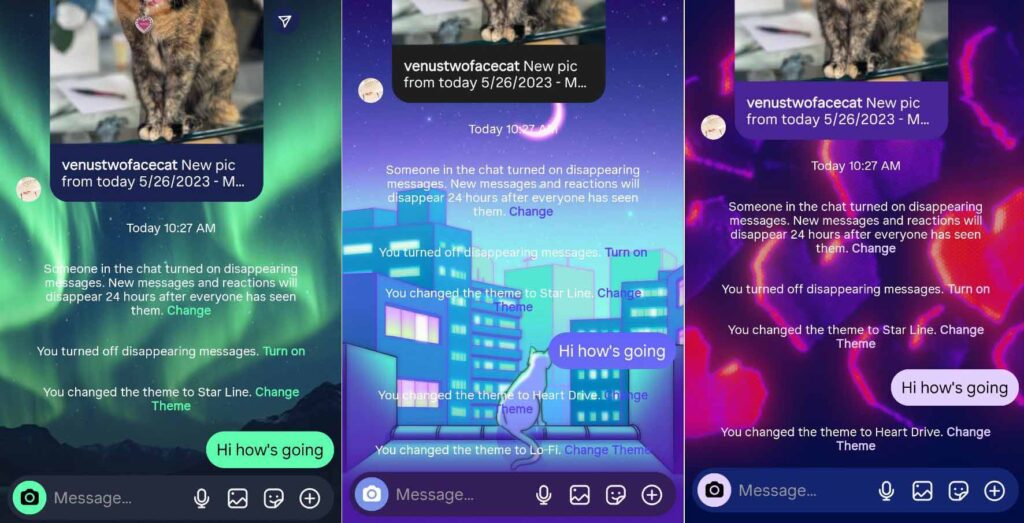
An Instagram chat theme is a visual customization package applied to an individual direct message conversation. It alters the chat window’s background, color gradients, and sometimes the styling of message bubbles, creating a unique ambiance for each dialogue. Unlike global app themes, these are applied per chat, allowing for tailored environments whether you’re coordinating with a colleague, sharing moments with family, or managing customer interactions for sales.
The themes library is diverse, catering to a wide array of tastes and occasions. Users can select from:
- Solid Colors and Gradients: For a clean, mood-based, or brand-aligned look.
- Patterns and Textures: Adding subtle depth and visual interest.
- Seasonal and Holiday Designs: To celebrate events and foster a sense of timeliness.
- Pop Culture and Special Event Themes: Often released in partnership with movies, music artists, or global events, making chats feel current and connected.
A Step-by-Step Guide to Customization
Applying a chat theme is an intuitive process designed for seamless user experience. To ensure you have access to the latest themes and features, first confirm your Instagram app is updated to the most recent version. Follow this detailed, step-by-step guide to transform your chat interface.
How to Change Your Chat Theme
The process is consistent across both individual and group chats, putting creative control at your fingertips.
- Access Your Messages: Open the Instagram app and tap the messenger icon (paper airplane or Meta logo) in the top-right corner of your home feed.
- Select a Conversation: Choose the specific chat you wish to personalize from your inbox list.
- Open Chat Details: Tap the recipient’s name or profile picture at the very top of the chat screen. This opens the “Chat Details” or “Info” menu.
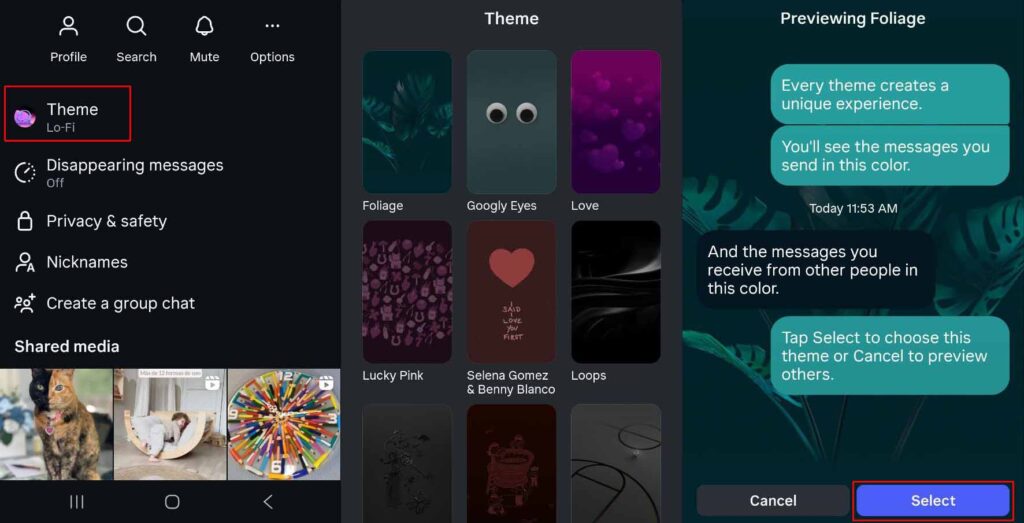
- Navigate to Themes: Within the menu, select the option labeled “Themes.” In some interface versions, you may need to tap “Chat Settings” first.
- Browse and Apply: Scroll through the carousel or grid of available themes. Preview each by tapping on it. Once you find the perfect match, confirm your selection to apply it instantly to the chat.
Reverting to the Default Theme
Should you wish to return a conversation to its original state, simply revisit the Themes menu. Scroll to the very end of the theme list, where you will find the “Default” option. Selecting this will immediately restore the standard Instagram chat background. This flexibility ensures you are never locked into a design choice.
Strategic Advantages of Utilizing Chat Themes
While visually delightful, chat themes offer concrete benefits that enhance usability, communication efficiency, and brand perception. These advantages make them more than just a decorative feature.
Enhanced User Engagement and Experience
A visually appealing interface directly impacts user engagement. A study on user interface design suggests that positive aesthetic perception can increase user satisfaction and perceived usability. Applying a pleasant or fun theme can make conversations feel more inviting, potentially leading to longer, more frequent, and more positive interactions. This is invaluable for community managers, influencers, and businesses using DMs for customer service.
Visual Organization and Efficiency
For power users with bustling inboxes, chat themes act as a rapid visual categorization system. Assigning a specific color or theme to different groups—such as a blue theme for work projects, a green theme for family, and a purple theme for close friends—allows for instant chat identification when scrolling. This reduces cognitive load and streamlines navigation, a simple yet effective productivity hack.
Brand Reinforcement and Professionalism
For businesses and creators, every touchpoint is a branding opportunity. Selecting a theme that incorporates your brand’s primary colors or aesthetic creates a cohesive and professional experience for clients and collaborators. It subtly reinforces brand identity during one-on-one interactions, demonstrating attention to detail and a modern approach to customer relations.
Privacy and Collaboration: The Social Dynamics of Themes
A common question arises regarding the social implications of changing a chat’s appearance: If I change the theme, will the other person know?
Visibility and Mutual Customization
Instagram chat themes are a collaborative and visible feature. When you apply or change a theme, it is applied to the shared chat window for all participants. The other user will not receive a push notification, but upon opening the conversation, the new theme will be immediately apparent. Furthermore, a small note may appear in the chat log indicating the theme was changed. Crucially, any participant in the chat has the ability to change the theme, and the most recent selection overrides the previous one for all parties. This fosters a sense of shared space and playful interaction.
Chat Themes in a Professional Context: A Balanced Analysis
The use of chat themes in business or professional communication requires careful consideration. The decision hinges on your brand voice, industry norms, and the nature of your relationship with the contact.
When to Embrace Themes for Business
- Brand-Aligned Visuals: Using a subtle gradient that matches your company colors can enhance professionalism and brand recall.
- Community and Creator Engagement: For influencers, artists, or brands with a vibrant, youthful community, a fun theme can strengthen community bonds and feel more approachable.
- Internal Team Chats: Using distinct themes for different project teams can boost morale and aid in quick visual sorting.
Potential Drawbacks and Considerations
- Perceived Informality: In highly formal industries (e.g., finance, law), or with new, high-value clients, a default or very subdued theme may be preferable to maintain a traditional professional tone.
- Accessibility and Readability: Some patterned or high-contrast themes could reduce text readability for some individuals. Always prioritize clear communication.
- Client Preference: The collaborative nature of the feature means a client could change a theme you’ve set. It’s a minor point, but worth noting in a controlled branding environment.
Future-Proofing Your DM Strategy for 2025 and Beyond
As Instagram invests in its messaging ecosystem, we can anticipate chat themes to become even more sophisticated. Potential developments may include:
Advanced Customization
The ability to upload custom background images or create color palettes, offering unparalleled alignment with brand guidelines.
Dynamic and Interactive Themes
Themes that react to message frequency, time of day, or contain subtle animations, deepening the immersive experience.
Integration with Other Features
Tighter coupling with features like Instagram Notes or Broadcast Channels, where a theme could define the visual tone of a broader communication strategy.
Conclusion: Mastering Your Digital Expression
The Instagram chat theme is a quintessential feature of modern digital communication—small in effort but significant in impact. It empowers users to curate their digital space, enhance functional clarity, and express brand identity or personal mood with a simple tap. As we move into 2025,
✨ Enhanced Content ✨
If you’re among the millions of people who use Instagram, you know that the app offers a lot more than just pretty pictures. One of the features that makes using Instagram more fun for its users is the ability to change the Instagram chat theme.
Whether you’re chatting with friends, family, or colleagues, or want to sell on Instagram DM, this tool can add a touch of personality to your interactions.
Now, you can change the look of your chat window to match your mood or style. That’s awesome, right?! But how to change the chat theme on Instagram? Let’s find out together.
What Is Instagram Chat Theme?
Instagram Messenger has undergone positive changes recently. Now, inside the application, you can turn on vanish mode on Instagram, react to Instagram messages, or search for DMs with a keyword. One of the new features you can now use on Instagram DMs is changing the theme!
Introduced on November 18, 2020, Instagram chat themes are visual customizations applied to individual DM conversations. They change the background, color scheme, and sometimes even the bubble styles or emojis in your chats.
You can choose from a variety of themes, including the ones that match how you feel or your favorite colors and movies.
Instagram chat themes are a great way to add personality to your conversations. You can use them to show your mood, and favorite colors, or even just to make things more fun. There are tons of different themes to choose from, so you’re sure to find one that’s perfect for you.
How To Change Chat Theme On Instagram
Now that we know the Instagram chat theme meaning, let’s have some fun and start changing it in our chats.
Changing a theme on Instagram chat is very easy. Just follow these steps:
- Open the Instagram App and tap on the paper airplane or Meta Messenger icon in the top-right corner of the home screen.
- Tap on the chat you want to customize its theme.
- At the top of the chat screen, tap the recipient’s name or profile picture to open the chat details.
- Select “Themes” (or “Chat settings” in some versions, then “Theme”).
- Browse the available Themes, select one, and apply it to the chat. Instagram offers over 20 predefined themes, including colors, patterns, and special designs.
You can always change your Instagram chat theme to its default, following the same steps. On the Themes window, go to the end of the theme list and find ‘Default’.
Note: Ensure your app is updated to the latest version for access to all features, as older versions may have limited options.
Benefits of Using Instagram Chat Themes
You may wonder if it’s worth knowing how to change a chat theme on Instagram. Does it come with any advantages?
While chat themes are primarily aesthetic, they offer several practical and emotional benefits:
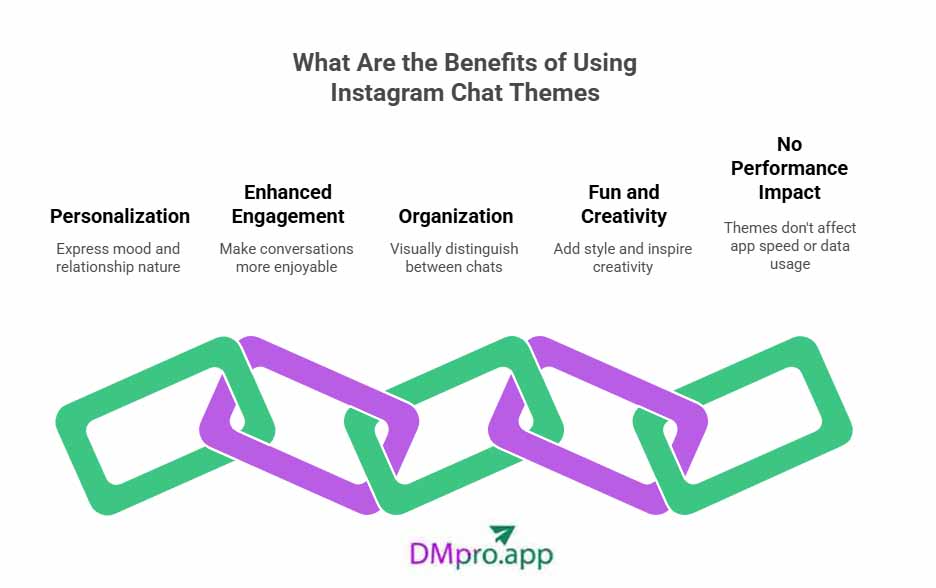
- Personalization: Themes allow you to express your mood, personality, or the nature of the relationship. For example, a romantic theme for a partner or a professional one for work chats.
- Enhanced Engagement: A visually appealing chat can make conversations more enjoyable, encouraging longer or more frequent interactions.
- Organization: Different themes can help visually distinguish between chats, making it easier to spot specific conversations at a glance.
- Fun and Creativity: It’s an easy way to add style and inspire creativity.
- No Performance Impact: Themes don’t affect app speed or data usage significantly, so you can experiment freely.
Overall, chat themes improve messaging by making it more engaging and user-friendly, which fits with Instagram’s emphasis on visual content.
If We Change Chat Theme On Instagram, Will They Know?
Chat themes are changed from both sides or for all members in a group conversation. Therefore, yes, if you change a chat theme on Instagram, the other user will be notified when they open the chat.
However, no notification will be sent to users, but they will see how many times you have changed the theme in your conversation.
Furthermore, if they change the theme, your chat theme will be changed, too.
Is It Good to Change the Instagram Chat Theme on a Business Chat?
So far, we know that changing a chat theme is fun for a social conversation. But what if you are using Instagram business chat? Is it professional to change the theme?
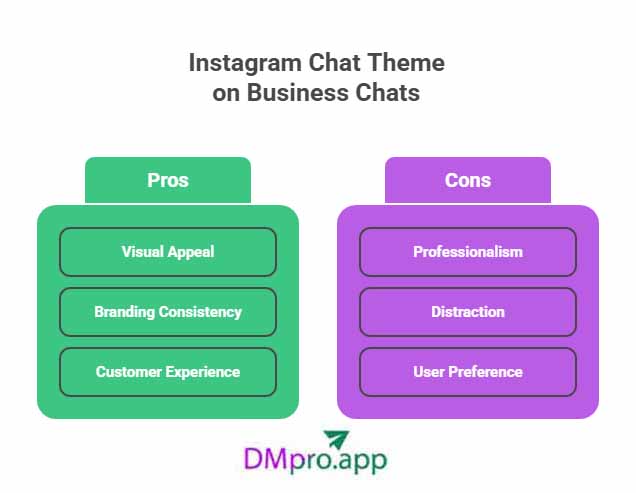
Changing the Instagram chat theme in a business chat can have both pros and cons:
Pros:
- Visual Appeal: A unique chat theme can make conversations more engaging and visually appealing, helping your brand stand out.
- Branding Consistency: You can choose colors and themes that align with your brand identity, creating a cohesive look and feel.
- Customer Experience: A personalized touch may enhance the customer experience, making interactions feel more friendly and approachable.
Cons:
- Professionalism: Some clients may prefer a more formal approach, and a quirky theme might not resonate well with everyone.
- Distraction: An overly busy or colorful theme could distract from the conversation and make important information harder to read.
- User Preference: Not all users may appreciate such changes, so it’s essential to consider your audience’s preferences.
So, what to do?
If you decide to change the chat theme, consider using subtle and professional colors that reflect your brand while ensuring the theme enhances, rather than detracts from, the communication experience. It’s always a good practice to stay adaptable based on client feedback.
Conclusion
Instagram’s default background and chat bubbles might be too bland for you. But the various, colorful Instagram chat themes allow you to change the mood and create a more fun space for having a friendly conversation. So, why not add some colors and be creative? You’ll have something to look at even if your friends are boring you!
However, because these changes are reflected on both your side and the person on the other end, it may be best not to change chat themes frequently or without first consulting the other party.
FAQs
Let’s take a quick look at questions that some users ask about the Instagram chat theme:
#1. Does the Instagram Chat Theme Change for Both?
When you change the theme of the chat, it affects everyone in the chat. The same goes for turning on the vanish mode on Instagram. So, if you want to change the chat theme, take into consideration that the person on the other side will also see the changes!
#2. Why Can’t I Get Themes on Instagram?
You should update your Instagram application. If after updating the application, you still have problems, you should check why your Instagram message features don’t work. Usually, it’s a connection problem or an Instagram glitch.
#3. Why Is My Instagram Chat Black?
Your Instagram DMs text is black for one of the following reasons:
- Instagram’s server is currently unavailable.
- You have no Internet connection.
- Instagram has a glitch that affects direct messages.
#4 Can I Customize the Instagram Chat Theme by Using an Image from My Gallery?
Currently, Instagram does not allow you to upload your own photos from your gallery to use as a custom chat background or theme. Therefore, you won’t be able to customize your chat theme. You can only choose a theme from its list.
#5 Will Changing the Theme Affect My Other Chats?
No, you can select a different theme for each conversation. Every change is made only in one conversation.
[elementor-template id="24702"]